

Share
Infrastructure for running AI inference and training in production with GPU autoscaling and deployment from Python without managing complex servers.
What is Modal?
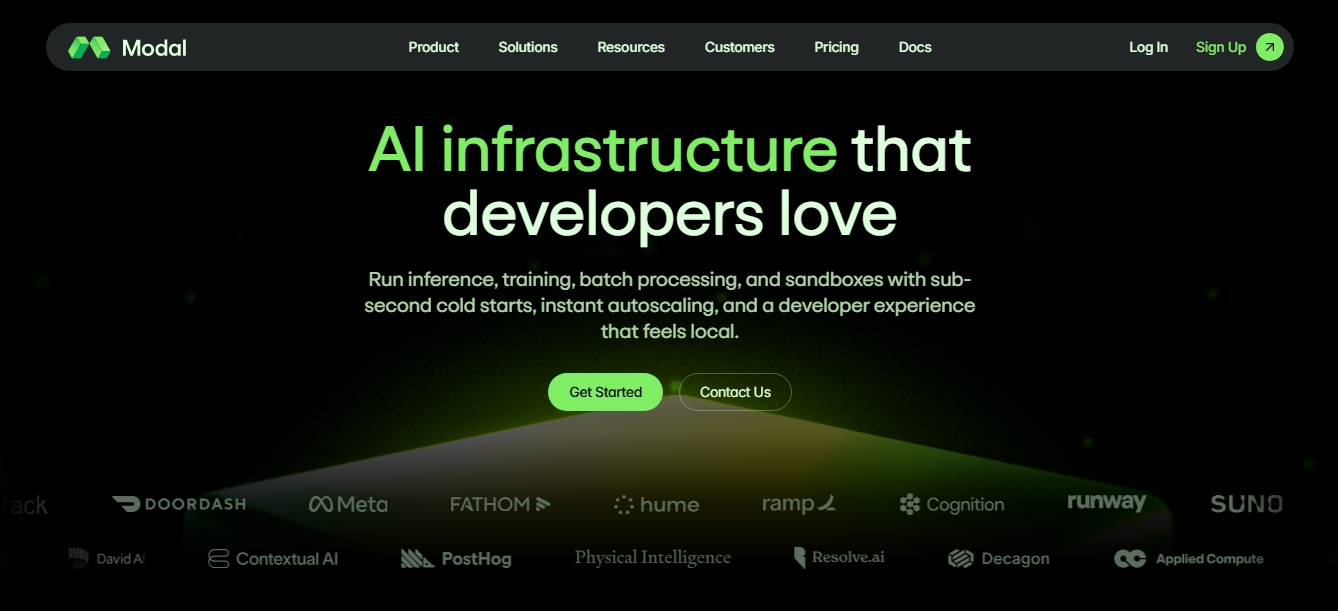
Modal is a high-performance AI infrastructure platform designed for developers to run complex cloud workloads with a local development experience. It is defined as a native runtime for artificial intelligence that enables the management of model inference, training, batch processing, and sandbox creation without the need to configure or maintain physical servers.
The tool operates through a Python SDK that allows you to define the entire infrastructure directly in your code. Using this approach, engineers can deploy applications that leverage instant autoscaling, going from zero to thousands of GPUs in a matter of seconds. Modal’s technology stands out for its sub-second cold starts, optimizing container execution so they start immediately to process heavy computing tasks.
Its core capabilities and practical benefits include:
LLM and Multimodal Inference: Deploy and scale language, image, video, and audio generation models. It supports low-latency architectures with native compatibility for token streaming and WebSockets.
Training and Fine-tuning: Facilitates the fine-tuning of open-source models on single- or multi-node clusters instantly, without the need for prior capacity planning.
Secure Sandboxes: Programmatic creation of ephemeral and isolated environments to run untrusted code securely and at scale.
Batch Processing: Parallel execution of tasks such as embedding generation, model evaluations, or processing large datasets using globally distributed infrastructure.
Modal features a serverless architecture, meaning the system intelligently distributes workloads across different regions and clouds. Users have access to cutting-edge specialized hardware, including Nvidia H100, A100, A10G, and L4, among others. By eliminating the need to manage complex job orchestrators, engineering teams can focus exclusively on the logic of their production AI applications.
To ensure a professional and robust environment, the tool integrates observability features that offer full visibility into every function and container through real-time logs. Furthermore, it complies with advanced security standards such as SOC2 and HIPAA, providing strict controls over data residency and process isolation, making it a reliable choice for companies handling sensitive information.
Modal features and use cases
How to use Modal
Modal FAQ
What is Modal and what is it used for?
It is a cloud infrastructure designed for developers to run AI inference, training, and batch processing with instant auto-scaling.
How does Modal’s pricing model work?
The platform uses a pay-as-you-go system where you are only billed for actual compute time by the second, with no costs for idle resources.
What types of GPUs does Modal’s infrastructure offer?
It provides access to a wide variety of Nvidia hardware, including H100, A100, L4, and T4 models, available immediately and globally.
Is there a free option to try Modal?
Yes, the initial developer plan includes $30 in monthly free credits to be used for compute on the platform.
What programming language is the Modal SDK based on?
The entire environment and logic are defined directly in Python, allowing you to ship code to the cloud and specify the required hardware from a local environment.
How does Modal handle application scaling?
The tool automatically scales from zero to over a thousand GPUs in seconds to handle demand spikes and scales back to zero when there is no activity.
Is it possible to train AI models with Modal?
Yes, the platform allows for the fine-tuning of open-source models on single or multi-node clusters immediately and efficiently.
What security and compliance measures does the platform offer?
The infrastructure is SOC2 and HIPAA certified, and it also offers proven container isolation and data residency controls.
What kind of support do Enterprise plan users receive?
Enterprise plan customers receive personalized support via private Slack channels and integrated machine learning engineering services.
Can credits from other cloud providers be used on Modal?
Currently, you cannot apply AWS or GCP credits, although there is a special credit program for startups that are part of AWS Activate.
Modal pricing and plans
Starter
$0 per month + compute costs
$30 per month in free compute credits.
Includes up to 3 users per workspace.
Limit of 100 containers and 10 concurrent GPUs.
Up to 200 deployed applications.
1-day log retention.
Limited scheduled functions (maximum 5 crons).
3-version deployment history for rollbacks.
Access to real-time metrics and region selection.
Team
$250 per month + compute costs
$100 per month in free compute credits.
Unlimited users.
Increased limit of 5,000 containers and 50 concurrent GPUs.
Up to 1,000 deployed applications.
30-day log retention.
Unlimited scheduled functions (crons).
Custom domains and static IP proxy.
Environment-level budgets and deployment rollbacks.
Enterprise
Custom pricing (Contact Sales)
Volume-based discounts.
Unlimited users and higher custom GPU concurrency.
Custom log retention.
Support via private Slack channel.
Integrated ML engineering services.
Advanced security: audit logs, Okta SSO, and HIPAA compliance.
Resource Costs (Pay-as-you-go)
Modal uses per-second billing based on the hardware used:
GPUs: From $0.000164/sec (Nvidia T4) to $0.001972/sec (Nvidia B300).
CPU: $0.0000131 per physical core/sec (minimum 0.125 cores per container).
Memory: $0.00000222 per GiB/sec (minimum 128 MiB per container).
Volumes: $0.09 per GiB/month (includes 1 TiB free per month).
Modal Screenshots
Modal user reviews
Write a review
Checking your session...
Modal Reviews
Loading reviews...
Modal alternatives
Sprite Fusion
Generate and animate professional pixel art for games using AI. Create sprites, character sheets, and normal maps with direct export to Unity and Godot.

Redditapis
API to read, post, vote, and DM on Reddit without app reviews. Pay-as-you-go pricing, no subscription, and fast setup for AI agents.

LaunchProof
Audit websites across various browsers and devices to detect security, performance, or accessibility flaws, offering reports with solutions to fix them.

ParseCrate
Open-source, self-hosted document processing API. Converts PDFs and Office files into structured content with OCR and table detection for AI applications.
Together Link
Connect coding agents to open models to cut costs. Keep your existing tools and settings while optimizing token usage in every session.
