

Share
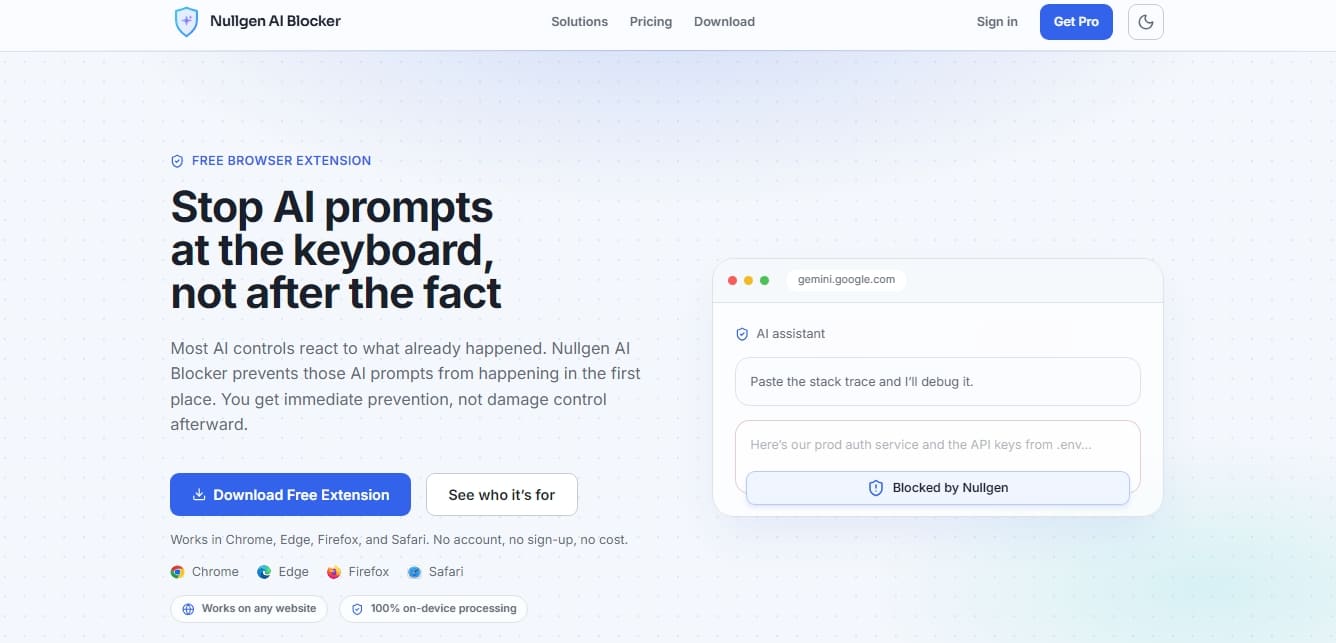
Browser extension that blocks AI chat typing in real time. Prevents prompt submissions on any website to protect privacy and avoid data leaks.
What is Nullgen AI Blocker?
Nullgen AI Blocker is a browser extension designed to intercept and block text input into artificial intelligence models directly from the keyboard. Unlike traditional filtering systems that operate at the domain level or after information has been sent, this tool prevents interaction before it even happens. Its primary function is to stop users from typing or pasting content into AI chat boxes while keeping all other website functionalities intact.
The technology behind Nullgen AI Blocker is based on 100% local on-device processing, ensuring total privacy. It requires no external servers to analyze content, as AI input field detection is performed automatically via algorithms that identify prompt behavior on any webpage. This allows the tool to be effective even against new or obscure AI assistants without the need for constant domain blocklist updates, making it a proactive solution against the unsupervised use of generative technology.
Key functional capabilities and benefits include:
Preventive prompt blocking: Prevents text from reaching the chat box, stopping data leaks or the unauthorized use of language tools.
Universal automatic detection: Identifies AI chat interfaces on any website, recognizing input patterns without relying on a static list of URLs.
Privacy by design: By running entirely on the user's computer, information is never uploaded to the cloud or stored externally, meeting high security standards.
Multi-platform compatibility: Works seamlessly across browsers such as Chrome, Edge, Firefox, and Safari, without requiring complex network configurations or certificates.
This tool is particularly useful for those managing critical environments. In the corporate sector, IT and cybersecurity teams can use it to mitigate the risk of confidential information leaks to public large language models (LLMs) and control shadow AI. In academia, it allows educators to ensure academic integrity on managed devices, while in a home environment, it helps parents ensure that schoolwork is completed without automated external assistance.
For organizations and educational institutions, Nullgen AI Blocker offers centralized management features. This enables administrators to force-deploy the extension across device fleets, manage temporary access requests via an approval system, and sync usage policies in real time. Currently, the system is optimized for English-language websites, providing a robust layer of control that does not interfere with productive web browsing.
Nullgen AI Blocker features and use cases
How to use Nullgen AI Blocker
Nullgen AI Blocker FAQ
What exactly is Nullgen AI Blocker and how does it work?
It is a browser extension that blocks text input in AI chat boxes before the data ever reaches the model.
Which browsers are compatible with Nullgen AI Blocker?
The tool is currently compatible with Chrome, Edge, Firefox, and Safari.
Can the tool see or store what I type on my computer?
No, all detection processing is performed locally on your device, and message text is never sent to external servers.
What is the difference between the free version and the Nullgen AI Blocker Pro plan?
The free version blocks text input locally, while the Pro plan adds an admin dashboard, device management, and centralized policies.
Does this extension block access to entire websites?
No. Unlike domain blockers, it allows you to browse the web normally and only disables the ability to type or paste content into AI chat fields.
Do I need to create an account to use the extension?
No registration, personal account, or setup is required for the free version after installing it in your browser.
What languages does Nullgen AI Blocker currently support?
The extension is currently optimized for English-language websites, though support for additional languages is planned for the near future.
Can the tool be easily uninstalled?
In the free version, any user can remove it from their browser. However, with paid plans, the installation can be forced so it cannot be tampered with by the end user.
Is Nullgen AI Blocker free forever?
Yes, the core text-blocking feature is permanently free, and the Pro plan is completely optional for those who require advanced controls.
Nullgen AI Blocker pricing and plans
Free Plan
Price: 0 $ (Free forever)
Core browser extension for blocking AI prompts.
On-device detection for maximum privacy.
No account creation or registration required.
Compatible with Chrome, Edge, Firefox, and Safari.
Restrictions: Currently only supports English-language websites. In this version, the user can manually uninstall the extension.
Family Plan
Price: 5,99 $ per month (Includes a 14-day free trial)
Includes all Free plan features.
Manage up to 4 children and 2 parents.
Centralized admin dashboard to manage users, devices, requests, and policies.
Request system to grant temporary or permanent AI access.
Compliance feature that locks the extension to prevent user deactivation or uninstallation.
Enterprise Plan
Price: 10 $ per user per month (Includes a 30-day free trial)
AI access request management with custom routing to supervisors or admins.
Advanced admin dashboard for device fleet and policy management.
Automated zero-touch deployment via Intune, Jamf, Google Workspace, and Group Policy.
Custom policy creation to allow or block specific websites by user.
For K-12 schools and universities, please visit our official website for specialized pricing.
Nullgen AI Blocker Screenshots
Nullgen AI Blocker user reviews
Write a review
Checking your session...
Nullgen AI Blocker Reviews
Loading reviews...
Nullgen AI Blocker alternatives



TriggerFlow
Automate Windows apps without APIs using computer vision and AI. Manage PC fleets, monitor processes, and provide centralized remote control.



MakeASkill
MakeASkill creates a free personal skill for your AI assistant from a few quick questions, plus up-to-date steps to set it up in each app.