

Share
Run open AI models locally or in the cloud with total privacy. Quickly integrate code agents and maintain full control over your data.
What is Ollama?
Ollama is an advanced platform designed to run open-source artificial intelligence models with a primary focus on speed and data privacy. This tool allows developers to integrate powerful language models into their workflows—either locally or through cloud infrastructure—facilitating the use of AI agents without compromising sensitive information security.
The architecture of Ollama enables the execution of open-source LLMs with high technical efficiency. It operates by providing dedicated capacity that ensures a high tokens-per-second rate, significantly outperforming conventional providers. This is critical when running multiple AI agents simultaneously while maintaining stable and predictable performance.
Regarding data management, the tool ensures that user data is never used to train external models. When running on a local computer, processed content never leaves the user's machine. For cloud deployments, it utilizes servers hosted in strategic regions such as Europe, the U.S., and Singapore, combining the power of cloud computing with the privacy benefits of local execution.
Key capabilities of Ollama include:
- Running frontier models such as DeepSeek v4, Mistral Large 3, Gemma 4, and Kimi-k3.
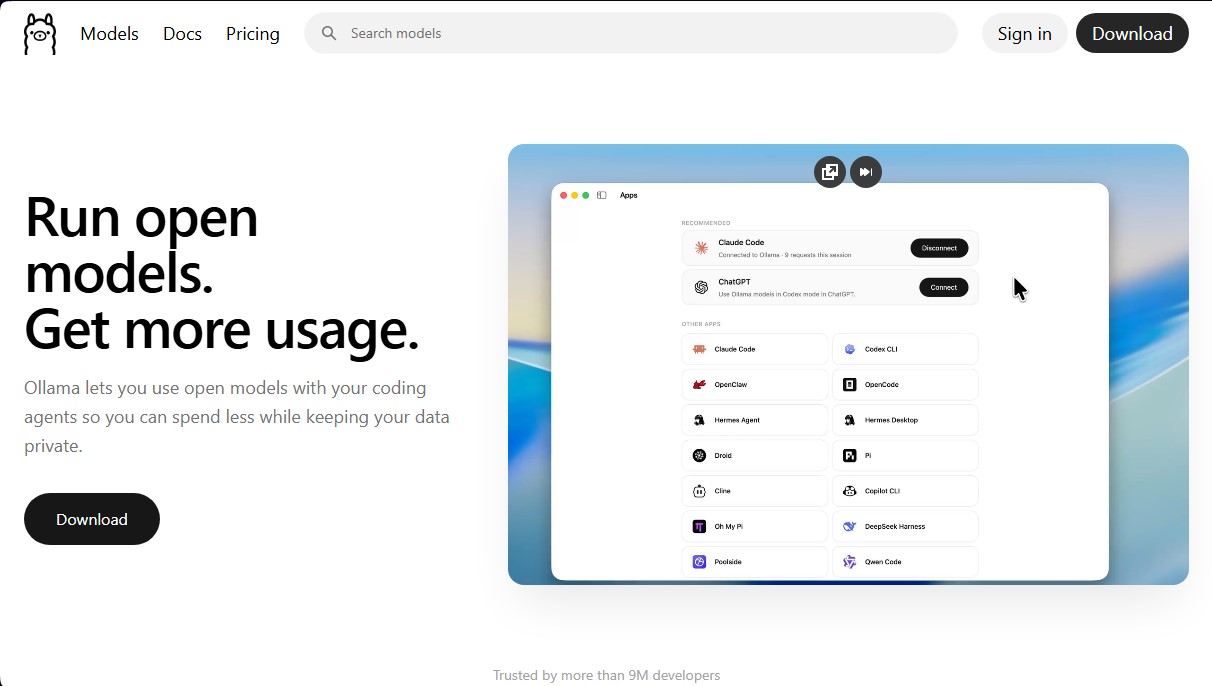
- Direct integration with development environments and tools like VS Code, Claude Code, n8n, and Codex.
- Compatibility with a wide variety of open weights that match the performance of proprietary closed models.
- The ability to switch between different models with a single command, optimizing the developer's workflow.
- Support for multiple coding agents such as Hermes Agent and OpenClaw.
This tool is especially useful for developers and companies seeking technological sovereignty. By providing access to open-license AI models, it eliminates dependency on external providers and reduces operational costs. Its system is compatible with desktop operating systems and mobile devices, allowing for a quick setup that can be up and running in just minutes.
Ollama has established itself as a critical infrastructure solution for deploying generative artificial intelligence, providing an environment where performance and privacy converge. Its ability to handle complex models with low latency makes it one of the most robust options for integrating natural language processing capabilities into modern applications and professional development environments.
Ollama features and use cases
How to use Ollama
Ollama FAQ
What is Ollama and what is it used for?
Ollama is a tool that allows you to run open-source language models locally or in the cloud. It integrates with your coding agents while keeping your data private.
Is it free to use local models on Ollama?
Yes, running models locally is completely free. There are no hidden limits or subscription fees for this setup.
How does Ollama guarantee the privacy of my training data?
Your data is never used to train third-party models, and everything you run locally stays exclusively on your machine and never leaves it.
What are the benefits of the Ollama Pro plan?
This plan costs twenty dollars per month and includes sixty dollars in usage credits, access to larger professional models, and the ability to run multiple models concurrently.
Can I integrate Ollama with my standard development tools?
Yes, the tool supports various integrations like VS Code, Claude Code, n8n, and other coding agents using a simple command.
How does the credit system work for cloud-based models?
It uses a pay-as-you-go system based on tokens consumed (per million), with lower rates during off-peak hours and on weekends.
Where are the models hosted when they aren't running locally?
All cloud-hosted models are located on servers in the United States, Europe, and Singapore to ensure fast and secure access.
What makes Ollama's speed different from other providers?
Ollama offers dedicated capacity that achieves high token-per-second processing speeds, even when running multiple agents simultaneously.
Does Ollama offer any plans specifically designed for businesses?
Yes, we offer Team plans with centralized billing and an Enterprise plan that provides custom access controls and dedicated Slack support.
Which language models are available on the platform?
The tool provides access to a wide range of cutting-edge open-source models like DeepSeek, Gemma, Mistral, and Llama, allowing you to switch between them without changing your workflow.
Ollama pricing and plans
Free ($0):
Run models locally at no cost.
Initial usage credits included for cloud models.
Access to starter models.
No service fees.
Option to add additional credits to unlock all models.
Pro ($20/month or $200/year):
Includes $60 in monthly usage credits.
Access to larger "pro" models.
Run multiple models concurrently.
Fast mode (coming soon).
Team ($500/month):
Unlimited users.
Includes $1,000 in monthly shared usage credits for the entire team.
Centralized administration and billing.
Priority support.
Shared projects, skills, and instructions (coming soon).
Enterprise (Custom pricing):
Team-specific model access controls.
Set cost budgets for users and API keys.
Private Slack channel with dedicated support.
Custom security questionnaires.
Pay-as-you-go (Additional credits):
Rates per million tokens by model (e.g., DeepSeek v4.1 Flash starting at $0.30 input / $1.20 output).
Off-peak pricing outside the 12:00 to 18:00 UTC window on weekdays and all weekend long.
Ollama Screenshots
Ollama alternatives

Nuclr Commander
Workspace for running multiple AI agents in parallel with a file manager. Supports local or external models and remote mobile monitoring.

StellarFirm
AI agents for founders to plan, build, and launch apps or websites. Automate technical and management tasks under your direct supervision and approval.


miniOrange MCP Server for WordPress
Securely connect AI agents to WordPress. Control permissions, protect sensitive data, monitor actions with audit logs, and manage human approvals.