
PhotoEditorAI.io
Share
Edit images with text prompts. Remove objects, change backgrounds, upscale resolution, and apply artistic styles for professional-grade results.
What is PhotoEditorAI.io?
PhotoEditorAI.io is an advanced cloud-based image editing tool that leverages artificial intelligence models to transform photographs through text instructions. Its primary goal is to democratize professional graphic design, allowing any user to retouch, enhance, or alter visual elements without needing to master complex software on their computer. It is an efficiency-oriented solution, ideal for those seeking editing precision and fast results for commercial or personal projects.
The platform's technology is powered by state-of-the-art models such as PhotoEditorAI 4.0, Nano Banana 2, and SeeDream 5.0. These AI engines enable a deep understanding of image composition, facilitating selective editing of elements like the sky, eyes, or background without altering the rest of the photograph. One of its most standout features is guaranteed character consistency, which allows users to maintain uniform features, proportions, and styles across different poses or settings—an essential capability for branding and creating coherent visual narratives.
Among its most relevant functional capabilities are:
- Background replacement and removal: Create clean scenes for e-commerce products or professional portraits in seconds.
- Object removal: Erase unwanted elements using simple text prompts.
- Style transfer: Apply artistic colors, textures, and tones from a reference image while preserving the original details.
- Restoration and enhancement: Includes tools for old photo restoration and an AI image upscaler that increases resolution up to 4K.
- Text and logo integration: Naturally combine typography and branding elements, automatically adjusting lighting and perspective.
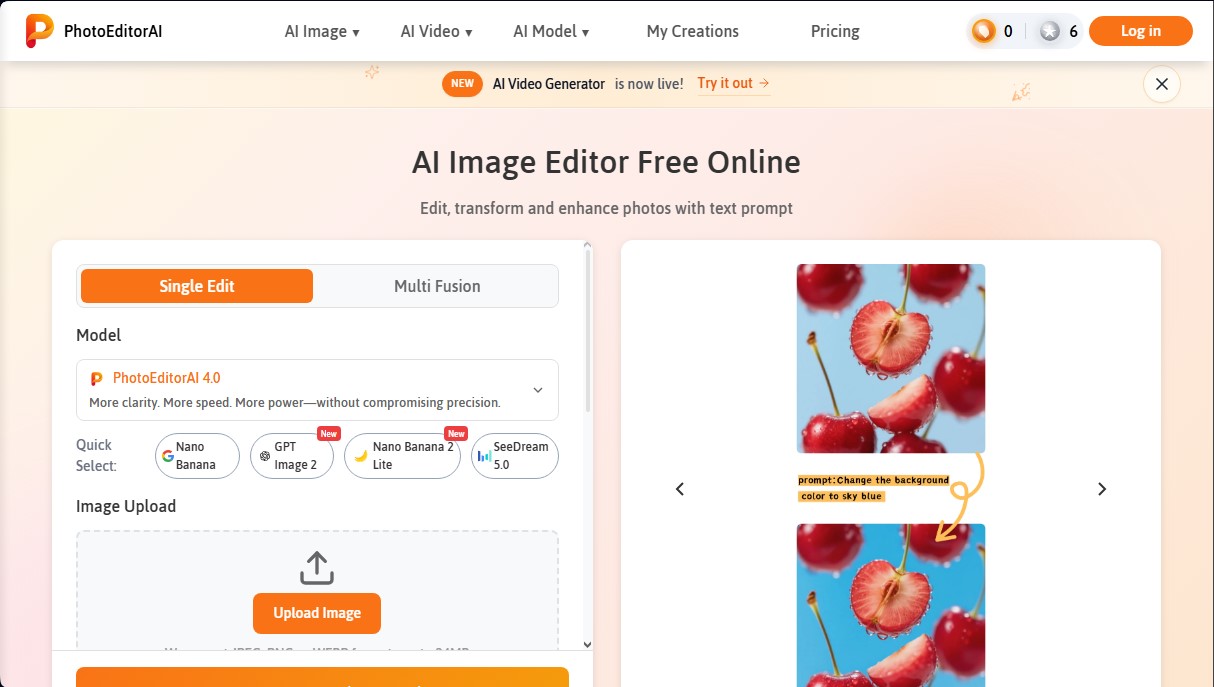
The workflow at PhotoEditorAI.io is straightforward and functional. Users select their desired AI model, upload an image in JPEG, PNG, or WEBP format (with a 24 MB limit), and write a prompt describing the changes. The tool provides control over aspect ratio and final resolution, processing changes remotely to deliver a high-quality file ready for use on social media or sales platforms like Amazon and Shopify.
This AI photo editor is especially useful for online sellers, marketing specialists, and content creators who require a professional aesthetic without traditional production costs. As a browser-accessible application, it eliminates technical barriers, making high-precision editing a simple and scalable task for any type of digital workflow.
PhotoEditorAI.io features and use cases
How to use PhotoEditorAI.io
PhotoEditorAI.io FAQ
What are the main image editing features offered by PhotoEditorAI.io?
PhotoEditorAI.io allows you to edit photos using text prompts to change backgrounds, remove objects, restore old photos, and apply professional-style transfers.
Can I use PhotoEditorAI.io for free?
Yes, the platform offers a free plan that provides ten daily credits upon logging in, allowing you to try out all the available tools.
What file formats does PhotoEditorAI.io support?
You can upload images in JPEG, PNG, and WEBP formats with a maximum file size of 24 megabytes per file.
Can I use the images created on PhotoEditorAI.io for commercial purposes?
Absolutely. Any image processed with this tool can be used for ads, e-commerce listings, or any other branding projects.
How does PhotoEditorAI.io ensure the privacy of my photos?
Images are protected via end-to-end encryption and are automatically deleted from the servers after a few days to ensure your content is not stored permanently.
What download resolutions are available on PhotoEditorAI.io?
The tool allows you to generate and download files in 1K, 2K, and up to 4K resolutions for maximum sharpness.
How do credits work on PhotoEditorAI.io?
Credits are deducted for each generation. You can purchase more through one-time payments that do not expire, allowing you to use them whenever you like without a recurring subscription.
PhotoEditorAI.io pricing and plans
Starter Plan (Free)
Price: 0 $
10 daily credits (requires daily login to claim).
Access to all Pro features.
No subscription required.
One-Time Payment (Credits)
Price: From 7 $ to 100 $ depending on the selected package
Lifetime access with no recurring fees.
Credits never expire and can be used at any time.
Higher image quality and faster processing speeds than the free version.
Available packages: 70 credits (7 $), 300 credits (15 $), 700 credits (28,90 $), 2000 credits (58,90 $), 3000 credits (78,90 $), and 5000 credits (100 $).
Enterprise Plan
Price: Check the official website
Tailored solutions for businesses and high-volume needs.
Priority support and a dedicated account manager.
API access.
Custom features and team collaboration tools.
Instant activation and money-back guarantee.
PhotoEditorAI.io Screenshots
PhotoEditorAI.io alternatives





BeautyPlus
BeautyPlus is an AI photo editor for web and mobile that retouches portraits, sharpens photos, removes backgrounds and objects, tries on hairstyles and makes images.