Share
Edit photos instantly with text commands. Remove backgrounds, enhance quality, and apply professional touch-ups with no technical skills required.
What is PiCrafts AI?
PiCrafts AI is an advanced AI-powered image editing tool that allows you to transform photographs using text prompts. Unlike traditional editing software, this AI image editor eliminates the need for complex technical skills or mastering professional design programs. Its primary function is to simplify the creative workflow, allowing any user to achieve high-quality results in seconds through an intuitive interface.
The system uses state-of-the-art models, such as Nano Banana and FLUX 2 Klein, to process user requests. PiCrafts technology analyzes visual content, identifies objects, people, and backgrounds, and applies precise changes using natural language. This makes AI image processing highly efficient: the user simply describes the desired change—such as "remove the background," "change the sky to a sunset," or "enhance details"—and the algorithm automatically executes the technical editing.
Key capabilities include:
- Instant background removal and deletion of unwanted objects.
- Color correction and lighting adjustments for professional finishes.
- Detail enhancement and image scaling (AI upscaler) to increase resolution.
- Specific features like hair color changes or face swaps.
- Generation of artistic variations and image optimization for e-commerce.
This platform is particularly useful for content creators, marketing managers, and online store owners who need optimized visual content for social media or advertising. By focusing on practical utility, PiCrafts AI facilitates the creation of visuals designed to convert, making it possible to perform edits that would normally take hours using manual tools. Additionally, the tool grants full commercial rights over the final results, ensuring that images can be used in professional settings without legal restrictions.
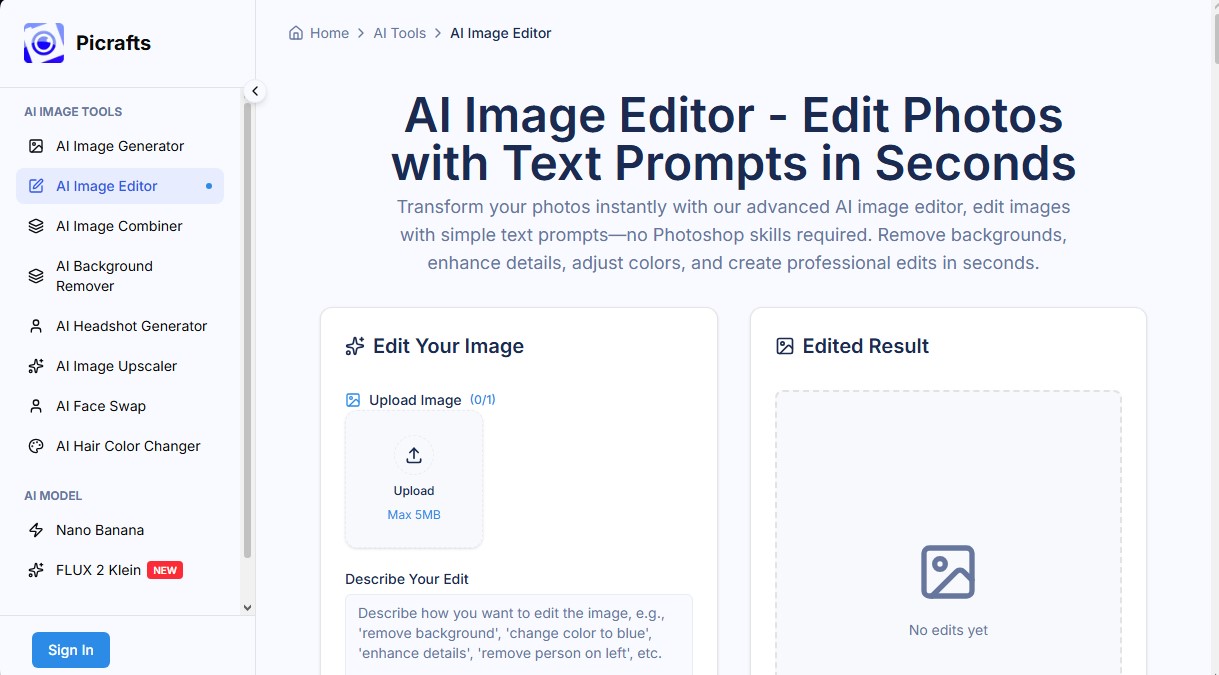
The workflow is completed in three simple steps: upload the image (compatible with JPG, PNG, and WebP formats up to 20MB), describe the edit in the text box, and download the high-definition result. The tool is fully functional on both desktops and mobile devices via the browser, allowing you to edit photos with AI from anywhere without needing to install additional software. It is a robust and accessible solution for optimizing visual production with surgical precision and speed.
PiCrafts AI features and use cases
How to use PiCrafts AI
PiCrafts AI FAQ
What is PiCrafts AI and how can it help me?
It is an intelligent photo editor that uses artificial intelligence to transform and enhance your images using simple text prompts, with no technical expertise required.
How do I use the PiCrafts AI image editor?
The process is very straightforward: just upload your photo, type the changes you want into the text box, and download the final result in seconds.
What kind of edits can I make with this tool?
You can remove or change backgrounds, erase objects or people, adjust colors, enhance details, and apply artistic effects simply by describing what you want to achieve.
Is it safe to upload my personal photos to PiCrafts AI?
Absolutely. All images are encrypted during upload and automatically deleted immediately after processing to guarantee your complete privacy.
Can I use images edited with PiCrafts AI for my business?
Yes, users with premium subscription plans have full commercial rights to use their creations for marketing, social media, or any other professional project.
What file formats and sizes does the platform support?
The tool is compatible with JPG, PNG, and WebP files with a maximum size of 20 megabytes per image to ensure fast processing.
Does PiCrafts AI work on my mobile phone?
Yes, our platform is optimized to work perfectly on mobile and tablet browsers without requiring you to download any additional apps.
How long does the AI take to process an image?
Most edits are completed within five to fifteen seconds, depending on the complexity of the task and the resolution of the original photo.
PiCrafts AI pricing and plans
Free Plan
Price: 0 €
- Allows dozens of edits per month.
- Maximum resolution of 2048x2048 pixels.
- High-quality results with no watermarks.
- Limited to personal, non-commercial use.
Starter Plan
Price: 9,90 $ al mes (7,90 $ al mes con facturación anual).
- Generate 100 images per month.
- 200 monthly credits.
- Access to all AI image tools.
- Commercial use rights included.
- Support for up to 4K resolution (4096x4096px).
Standard Plan
Price: 29,90 $ al mes (24,90 $ al mes con facturación anual).
- Generate 400 images per month.
- 800 monthly credits.
- Access to all AI image tools.
- Commercial use rights included.
- Support for up to 4K resolution.
Premium Plan
Price: 69,90 $ al mes (59,90 $ al mes con facturación anual).
- Generate 1,000 images per month.
- 1,000 monthly credits.
- Access to all AI image tools.
- Commercial use rights included.
- Priority processing.
- Support for up to 4K resolution.
PiCrafts AI Screenshots
PiCrafts AI alternatives




BeautyPlus
BeautyPlus is an AI photo editor for web and mobile that retouches portraits, sharpens photos, removes backgrounds and objects, tries on hairstyles and makes images.