Share
Transform meeting recordings into process diagrams and professional presentations. Automatically detect bottlenecks and automation opportunities.
What is RapidMap?
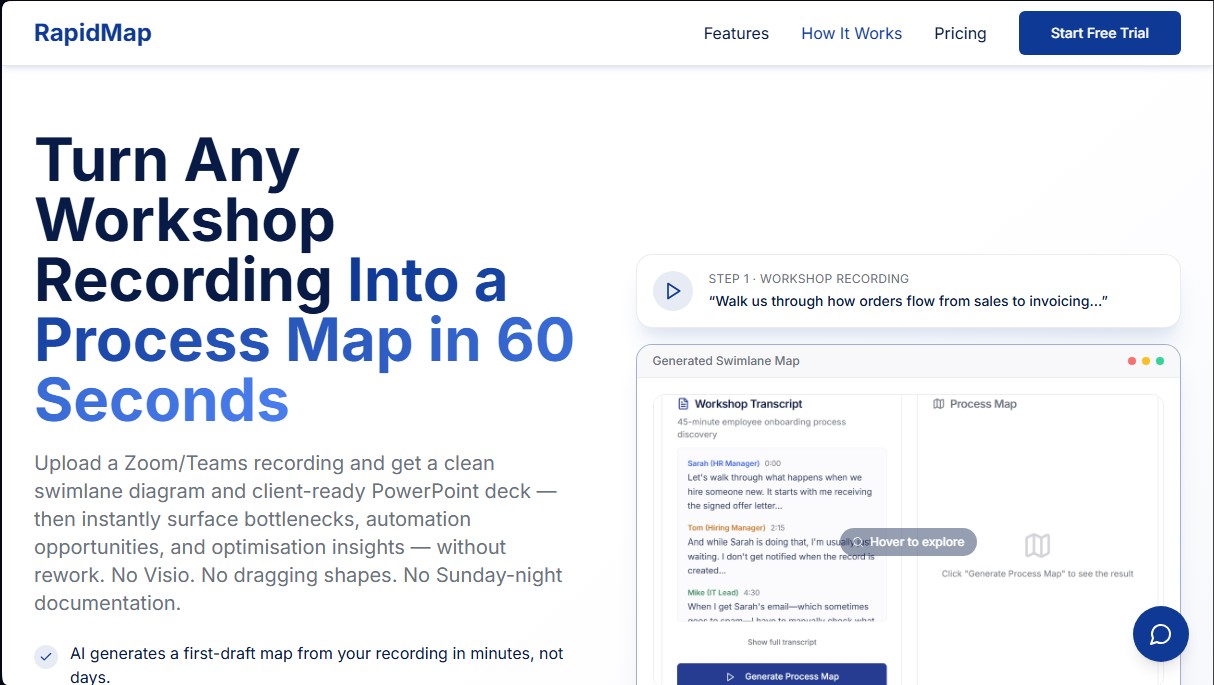
RapidMap is an advanced artificial intelligence solution designed to automatically transform workshop and meeting recordings into detailed process maps. This tool enables independent consultants and internal teams to convert audio or video files from platforms like Zoom or Teams into swimlane diagrams and professional PowerPoint presentations in a matter of minutes. Its primary function is to eliminate the manual workload involved in documenting operational flows, allowing users to move from a technical conversation to a client-ready deliverable without the need for traditional drawing tools.
The operation of RapidMap is based on an optimization AI engine that processes natural language to identify roles, responsibilities, decision points, and bottlenecks. The process is straightforward: first, the session is captured using a mobile or web recorder, or an existing file is uploaded; second, the AI generates a draft map structured by functions; and finally, the user reviews and adjusts the details before exporting. This intelligent transcription technology automatically detects task handoffs and inefficiencies, offering a clear view of how work actually flows within an organization.
The tool's core capabilities include:
- Automated swimlane diagram generation: Visually structures who performs each task, identifying delays and dependencies between departments.
- Corporate PowerPoint export: Generates professional presentations featuring the user's branding, including current state, future state, and implementation roadmaps.
- Bottleneck detection and automation: The AI highlights critical areas of inefficiency and suggests automation opportunities to optimize operational performance.
- Multi-level process views: Offers varying degrees of detail, from executive summaries to deep operational levels (Levels 1-3).
- ROI analysis and comparisons: Creates "before and after" visualizations with time-saving estimates, which are essential for building solid business cases.
RapidMap is especially useful for professionals who need to deliver high-quality results under tight deadlines, allowing them to reclaim between 5 and 8 billable hours per project by avoiding manual drawing in applications like Visio or Lucidchart. By automating technical documentation, consultants can focus on strategic analysis and client relationships, ensuring that workflows are captured accurately and presented flawlessly from the very first draft generated by artificial intelligence. It is a key tool for modernizing operations consulting and business process management.
RapidMap features and use cases
How to use RapidMap
RapidMap FAQ
What exactly is RapidMap, and how does it help independent consultants?
RapidMap is an AI-powered tool that automatically converts meeting recordings into professional swimlane diagrams and PowerPoint presentations.
How much time can I save documenting processes with RapidMap compared to traditional methods?
The platform reduces the typical ten hours of manual work in Visio to just fifteen minutes of reviewing an AI-generated draft.
Do I need to follow a specific script during the recording for RapidMap to work correctly?
No special script is necessary; simply conduct your workshop or meeting as you normally would, and the tool will automatically detect roles and process steps.
What is included in the PowerPoint file that RapidMap generates for client delivery?
The document includes current and future state maps, along with identified pain points and a ready-to-present ROI analysis.
Can I customize the documents exported from RapidMap with my own branding?
Yes, the tool allows you to apply your logo and brand colors to all exported presentations to ensure your deliverables maintain a professional and consistent aesthetic.
Does RapidMap offer a free trial period for new users?
The platform offers a fourteen-day free trial on all plans, allowing you to test every feature without needing to enter your credit card information.
What happens if RapidMap doesn’t help me save time on my consulting projects?
You are covered by a thirty-day money-back guarantee, which provides a full refund if the tool doesn’t save you at least five hours of work on your first project.
What types of audio or video files can I upload to the platform?
You can upload meeting recordings from Zoom or Teams, or use the web and mobile recorder built directly into the app.
RapidMap pricing and plans
Free Trial
Available for 14 days on all plans (no credit card required). Includes full access to all features to test the tool before subscribing.
Starter
Price: £39/month (plus tax).
- 5 projects (up to 5 workshops per project).
- 20 AI-generated process maps per month.
- 2 hours of audio transcription per month.
- PowerPoint export.
- Full map editing.
- 1 collaborator seat.
- Email support.
Professional
Price: £99/month (plus tax).
- Unlimited projects and workshops.
- Unlimited AI-generated process maps.
- 10 hours of audio transcription per month.
- PowerPoint and Visio export.
- AI bottleneck detection.
- Automation opportunity highlighting and optimization layers.
- Client folders and full branding (logos and colors).
- Priority support.
Firm
Price: £299/month (plus tax).
- Everything in the Professional plan.
- Up to 5 team members.
- 50 hours of audio transcription per month.
- Shared team workspaces.
- White-label exports.
- Dedicated account manager and Zoom support.
RapidMap Screenshots
RapidMap user reviews
Write a review
Checking your session...
RapidMap Reviews
Loading reviews...
RapidMap alternatives



TriggerFlow
Automate Windows apps without APIs using computer vision and AI. Manage PC fleets, monitor processes, and provide centralized remote control.

Relevance AI
Relevance AI lets companies design AI agents that take on work in sales, customer support, marketing, HR and operations, wired into the tools they already use.