

Share
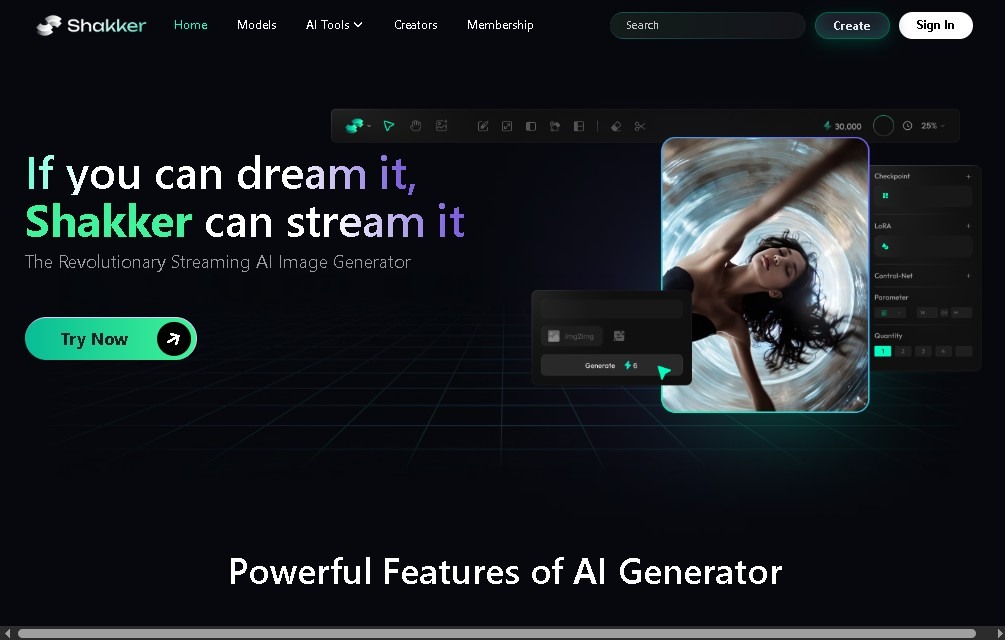
AI web image generator and editor. Create illustrations, retouch photos, enhance resolution, and apply advanced artistic styles for professional results.
What is Shakker?
Shakker is an artificial intelligence platform designed for generating and editing high-quality artistic images directly from your browser. This tool allows users to create complex visual content without the need to install heavy software on their computers, facilitating agile workflows for graphic designers, content creators, and visual marketing professionals. Its architecture is geared toward delivering professional results in illustrations, realistic photography, and concept art.
The technology behind Shakker AI is based on advanced Stable Diffusion models, ensuring high versatility in the creation of digital assets. The platform integrates powerful interfaces inspired by WebUI or ComfyUI workflows, allowing for precise technical control over composition and style. Users can leverage an extensive library of pre-trained AI models to switch between hyper-realistic aesthetics, illustration styles, or vector designs, adapting to the specific needs of each graphic project.
Key capabilities include:
- Text-to-image generation: Creating detailed images from text descriptions, optimized for developing logos, backgrounds, and digital art.
- Inpainting editing: A feature that allows for modifying or correcting specific parts of a generated image without altering the rest of the composition.
- Image upscaling: A tool to improve the resolution and sharpness of files, enabling their use in larger formats or for printing.
- Visual style transfer: The ability to apply the aesthetic of a visual reference to new creations, maintaining brand consistency.
- Customization and style mixing: Advanced composition settings and integrated design tools to personalize every detail of the final result.
This generative AI tool is especially useful for those looking to optimize their creative processes in social media, advertising, or video game development. Since it operates online, it is accessible from any mobile device or internet-connected hardware, promoting immediate productivity and access to exclusive image processing models. Shakker’s ability to manage creative workflows makes it an efficient solution for creating branding, visual prototypes, and promotional material, removing the technical barriers associated with manually configuring diffusion algorithms.
The platform's functional approach allows both novices and prompt engineering experts to achieve precise results. Thanks to its cloud processing capabilities, users can offload the computational load to the application's servers, obtaining stylized or realistic images in a matter of seconds—perfect for accelerating any phase of visual pre-production.
Shakker features and use cases
How to use Shakker
Shakker FAQ
What exactly is Shakker, and what can I use it for?
Shakker is a browser-based AI platform that allows you to generate and edit high-quality artistic images using text prompts or advanced design tools.
Does Shakker offer a free version for new users?
Yes, there is a free plan that provides approximately 200 daily renewable tokens for generating basic images without watermarks.
How do tokens work on the Shakker platform?
Tokens act as the system's internal currency and are consumed every time you generate or edit an image. The number of tokens available depends on your specific subscription plan.
Can I use images generated on Shakker for commercial purposes?
Commercial use is permitted for users subscribed to the Basic and Advanced paid plans, while the free plan has certain limitations in this regard.
What image editing features does Shakker offer?
The platform includes inpainting for editing specific areas, upscaling to improve resolution, and style transfers to apply the visual look of one image to another.
Do I need to install any special software to use Shakker?
No installation is required; the tool runs entirely online directly through your web browser.
What additional benefits does the Shakker Advanced plan offer?
This plan provides 35,000 monthly tokens and allows for unlimited image generation in "relaxed mode" once your primary credits have been exhausted.
Which AI models does Shakker use to create art?
It uses advanced models based on technologies like Stable Diffusion, which can create everything from realistic photographs to custom illustrations and logos.
Shakker pricing and plans
Free Plan
Price: $0 per month.
- ~200 daily tokens (refreshed daily).
- Basic image generation without watermarks.
- No full access to exclusive models.
- Commercial rights restrictions in certain cases.
Basic Plan
Price: Approximately between $10 and $12 per month.
- ~15,000 tokens per month.
- Access to exclusive models.
- Faster generation speeds.
- Allows commercial use of generated images.
- Expanded features and functionality.
Advanced Plan
Price: Approximately between $24 and $30 per month.
- ~35,000 tokens per month.
- Unlimited generation in "relaxed" mode after exhausting monthly tokens.
- Full access to all premium models.
- Enhanced file export options.
- More powerful editing and creation tools.
Shakker Screenshots
Shakker alternatives
NeotypeLab
NeotypeLab uses AI to plan paint schemes for Gunpla, mecha girls and Zoids, with real hobby paint codes, a spraying sequence, a shopping list and an HD preview.

ImageToSTL.org
Convert JPG and PNG images into STL files for 3D printing using AI. Generate detailed 3D models ready for instant download.
Image to 3D
Convert 2D images and sketches into textured 3D models using AI. Export in GLB, STL, or USDZ for video games, 3D printing, and augmented reality.