

Share
What is VizText?
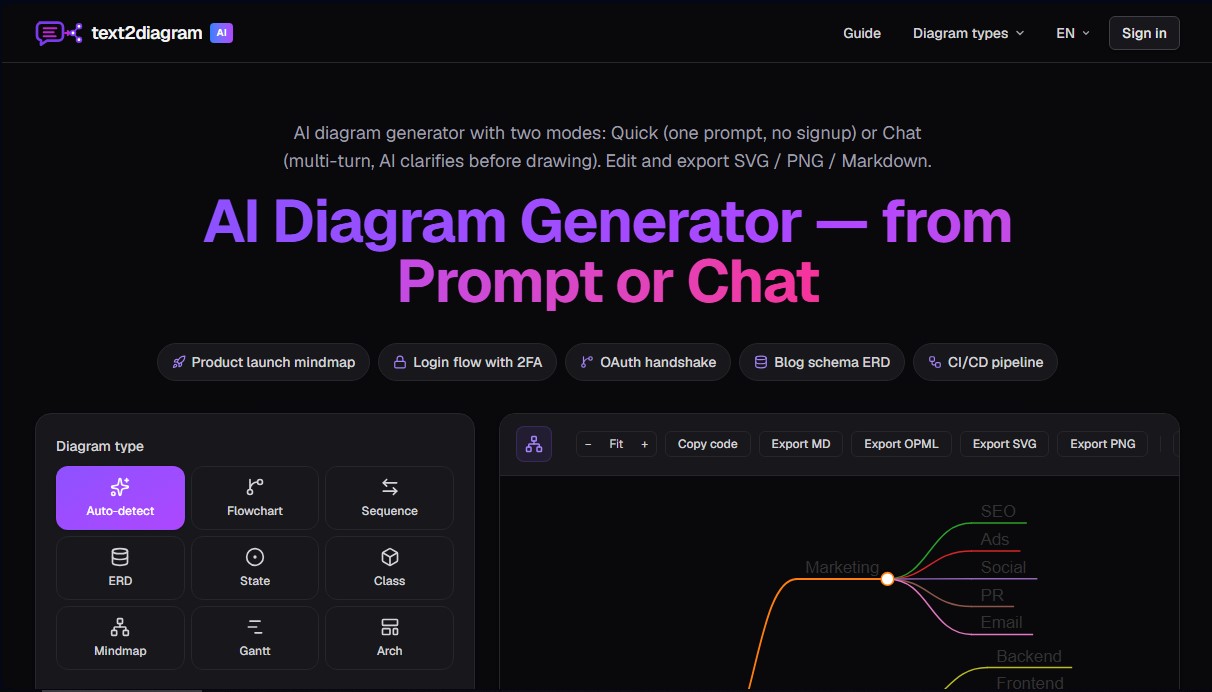
VizText (formerly text2diagram) is an AI diagram generator designed to transform natural language descriptions into structured, professional visual representations. This tool allows engineers, product managers, and technical writers to create complex diagrams without needing to master specific coding syntaxes like Mermaid, PlantUML, or Graphviz. The system processes plain text instructions to automatically generate the necessary source code and render the graphic in real time, making documentation and project planning easy from any computer or mobile device.
How it works
The platform offers two primary operating modes to meet different precision needs. Quick mode provides immediate results from a single command, making it ideal for simple workflows without requiring registration. On the other hand, Chat mode establishes an interactive dialogue where the artificial intelligence asks clarifying questions about actors, events, and edge cases before drawing. This conversational approach ensures that more detailed diagrams, such as backend architectures or complex business processes, accurately reflect the user's intent and reduce interpretation errors.
Key features
Technologically, VizText uses advanced language models to interpret the semantics of the message and automatically classify it among various supported diagram types:
- Flowcharts: To represent registration processes, CI/CD pipelines, or incident response protocols.
- Sequence diagrams: Useful for visualizing interactions between APIs, services, and databases with request and response arrows.
- Entity-Relationship Diagrams (ERD): For database schema design, defining primary keys and cardinality.
- Mind maps: Ideal for product launch planning or hierarchical study note-taking.
- State diagrams: To model subscription lifecycles or order statuses.
- Class diagrams: Geared toward software design and object-oriented architecture with attributes and methods.
- Gantt charts: For managing project timelines, milestones, and dependencies on a timeline.
More details
The tool relies on standards like Mermaid and markmap, allowing for highly flexible post-editing. Users have a split view where they can manually adjust the generated code, seeing changes reflected instantly on the preview canvas. Once the design is complete, VizText allows for exporting in SVG vector formats for lossless scaling, PNG for presentations, or Markdown and OPML formats for integration into note-taking and outlining tools. Additionally, the system supports input in several languages, including English and Chinese, ensuring that the labels of the final diagram maintain the requested linguistic consistency. This functional versatility removes technical barriers, allowing you to go from a text-based idea to a technical diagram in seconds.
VizText features and use cases
How to use VizText
VizText FAQ
What exactly is VizText, and what is it used for?
It is an AI-powered diagram generator that allows you to create professional visual diagrams from natural language descriptions.
Is VizText free to use?
Yes, Quick Mode is completely free and requires no registration, while Chat Mode is also free but requires you to log in to maintain the conversation context.
What types of diagrams can I generate with VizText?
The platform allows you to create flowcharts, sequence diagrams, entity-relationship models, class diagrams, state diagrams, mind maps, and Gantt charts.
What is the difference between Quick Mode and Chat Mode?
Quick Mode generates a diagram instantly with a single prompt, while Chat Mode allows the AI to ask clarifying questions to better define the details before drawing.
Do I need to know Mermaid syntax to use the application?
No coding knowledge is necessary because the AI writes the syntax for you, though a split-view is available for manual code editing if you wish.
In what formats can I export my diagrams?
You can export your creations in SVG format for lossless scaling, PNG for standard images, and Markdown or OPML for mind maps.
Can I write my instructions in Spanish to generate the diagrams?
Yes, the tool supports instructions in Spanish and will automatically generate the diagram with all text and labels in that same language.
What can I do if the AI adds elements I don't need?
In Chat Mode, you can reject AI assumptions with a single click, and the diagram will be immediately redrawn without those elements.
Is there a daily usage limit on VizText?
There is a daily limit per IP address that is generous enough for normal use and resets automatically every 24 hours.
Are my data and the diagrams I generate saved?
Diagrams from Quick Mode are not stored in the database, while Chat Mode saves your history to your account so you can resume your projects later.
VizText pricing and plans
Reference price: 0 USD. Source · Verified: October 19, 2026
Free
- Quick mode supports every diagram type with no signup, watermark or card.
- Chat mode is free too, with sign-in to keep the conversation context.
- Daily per-IP generation limit.
VizText Screenshots
VizText user reviews
Write a review
Checking your session...
VizText Reviews
Loading reviews...
VizText alternatives
Sprite Fusion
Generate and animate professional pixel art for games using AI. Create sprites, character sheets, and normal maps with direct export to Unity and Godot.
Redditapis
API to read, post, vote, and DM on Reddit without app reviews. Pay-as-you-go pricing, no subscription, and fast setup for AI agents.

LaunchProof
Audit websites across various browsers and devices to detect security, performance, or accessibility flaws, offering reports with solutions to fix them.
ParseCrate
Open-source, self-hosted document processing API. Converts PDFs and Office files into structured content with OCR and table detection for AI applications.
Together Link
Connect coding agents to open models to cut costs. Keep your existing tools and settings while optimizing token usage in every session.
