

Share
Automatically remove any video background with AI—no green screen required. Export professional-quality clips with transparency.
What is VidBG Remover?
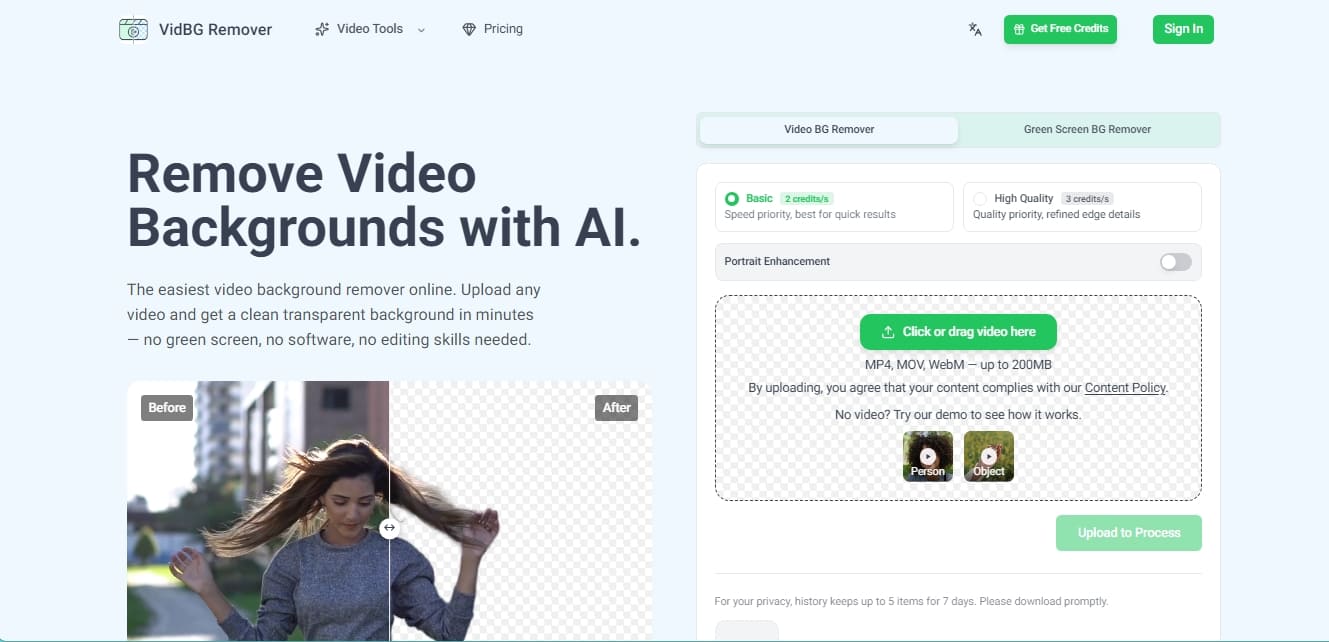
VidBG Remover is an online tool specialized in AI-powered video background removal. Its primary function is to allow any user, without the need for technical editing skills or green screens (chroma key), to obtain clips with transparent backgrounds in an automated and professional way. The platform processes files in MP4, MOV, and WebM formats with a size limit of up to 200MB, facilitating a streamlined workflow directly from a computer browser.
The technology behind this application is based on advanced person and object segmentation algorithms. Unlike other conventional editors, VidBG Remover stands out for its ability to maintain edge stability frame by frame, eliminating the flickering effect that often appears in low-quality automatic cutouts. The system allows users to choose between two processing modes based on the project's needs: Basic mode, which prioritizes delivery speed, and High Quality mode, designed to refine complex edge details and improve the subject's appearance through the Portrait Enhancement feature.
The functional capabilities and benefits of this AI tool include:
Chroma-free background removal: The ability to isolate subjects in real-world settings, such as offices, outdoors, or bedrooms, without the need for studio lighting or solid-colored backgrounds.
Real alpha channel export: Allows for downloading results in WebM (VP9) or MOV (ProRes 4444) formats, ensuring authentic transparency that integrates directly into other projects.
Professional compatibility: Generated files are compatible with leading editing software such as Adobe Premiere, DaVinci Resolve, After Effects, and CapCut, eliminating the need for manual masking.
Fine detail handling: The AI engine is trained to recognize and maintain the integrity of challenging elements like hair, fingers, and fast-moving limbs.
VidBG Remover is highly useful for content creators seeking minimalist backgrounds, e-commerce professionals who need to place products in various settings, and educators recording online courses who want to cleanly overlay their image onto presentations. As a cloud-based solution, processing does not depend on the power of a mobile device or local hardware, delivering results in just a few minutes. User privacy is managed via a temporary history that stores the most recent processed files for 7 days before their permanent deletion.
VidBG Remover features and use cases
How to use VidBG Remover
VidBG Remover FAQ
What is VidBG Remover and what is it used for?
VidBG Remover is an online tool that uses artificial intelligence to automatically remove the background from any video without the need for a green screen or any editing skills.
Do I need to install any software to use VidBG Remover?
No, you don't need to install any software on your computer since the entire process takes place directly in the cloud through your web browser.
What file formats does the platform support?
You can upload videos in MP4, MOV, and WebM formats, as long as the file size does not exceed 200 megabytes.
Do I need a green screen for the tool to work correctly?
You don't need a green screen because the AI technology automatically detects people or objects and separates the background in any environment.
How can I download my video with a transparent background?
You can export your work in WebM or MOV format with a real alpha channel, which preserves transparency when importing it into editors like Premiere or CapCut.
How does the VidBG Remover payment system work?
The tool uses a pay-as-you-go system with credit packs that never expire, allowing you to avoid fixed monthly subscriptions.
What is the difference between basic and high-quality processing?
Basic mode prioritizes speed for quick results, while high-quality mode focuses on perfecting edge details and hair.
How long are my files kept in my history?
For privacy reasons, the history stores a maximum of five items for seven days, so you must download your videos before they are automatically deleted.
Can I use VidBG Remover for e-commerce videos or advertisements?
Yes, the tool is ideal for creating product ads or online courses, allowing you to professionally place the presenter over any background.
What happens if my video has a lot of movement or camera shake?
The background removal technology is designed to keep edges stable and flicker-free, even in action shots or scenes with complex camera movements.
VidBG Remover pricing and plans
Free Trial
Free trial credits available upon sign-up.
Try AI background removal with no credit card required.
Starter: $9.9 (One-time payment)
240 credits.
Equivalent to approximately 120 seconds of video in Basic mode.
Credits never expire.
Export in WebM (VP9) or MOV (ProRes 4444) format with a real alpha channel.
Creator: $29.9 (One-time payment)
960 credits.
Equivalent to approximately 480 seconds of video in Basic mode.
Credits never expire.
Export in WebM (VP9) or MOV (ProRes 4444) format with a real alpha channel.
Pro: $79.9 (One-time payment)
3,000 credits.
Equivalent to approximately 1,500 seconds of video in Basic mode.
Credits never expire.
Export in WebM (VP9) or MOV (ProRes 4444) format with a real alpha channel.
Max: $199.9 (One-time payment)
12,000 credits.
Equivalent to approximately 6,000 seconds of video in Basic mode.
Credits never expire.
Export in WebM (VP9) or MOV (ProRes 4444) format with a real alpha channel.
Restrictions and credit usage:
Basic Mode: Consumes 2 credits per second of video.
High Quality Mode: Consumes 3 credits per second of video (includes portrait enhancement and refined details).
Upload limit: Files up to 200 MB in MP4, MOV, or WebM format.
Maximum duration per clip: Approximately 60 seconds.
VidBG Remover Screenshots
VidBG Remover alternatives



Osmo Studio
AI animation studio for professional motion graphics and videos. Control every detail, collaborate with teams, and export with transparent backgrounds.



AI Video Text Remover
Use AI to remove subtitles, logos, and watermarks from your videos. Automatically reconstruct backgrounds for a clean, blur-free result.