

Share
Convert invoices and receipts into structured JSON data via OCR. Automate accounting with precision and integrate seamlessly into your workflows.
What is WiseOCR?
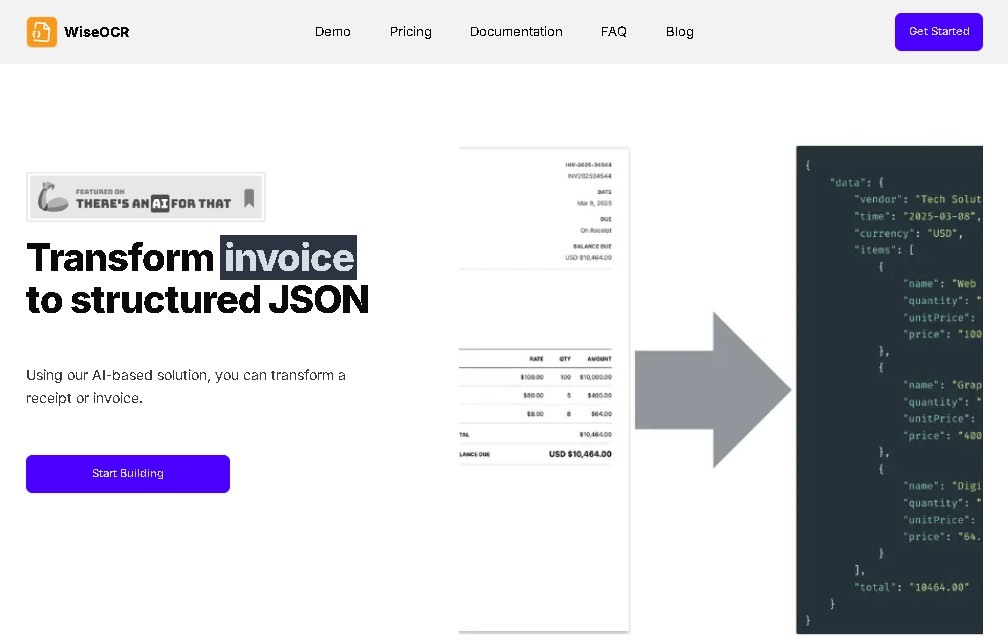
WiseOCR is an advanced optical character recognition (OCR) solution specializing in digitizing and extracting data from financial documents. Its primary function is to transform receipts and invoices, whether physical or digital, into structured data in JSON format. This capability allows information to be immediately integrated into various management systems and software applications, streamlining the work of accountants, managers, and financial departments looking to optimize their administration.
The technology behind WiseOCR was developed to identify text with high precision, regardless of the document layout's complexity or the variety of fonts used. The system can process a wide range of file formats, including JPG, PNG, HEIF, TIFF, and PDF, ensuring fast and accurate data capture that minimizes the common errors associated with manual data entry.
Regarding security, the tool prioritizes data privacy by implementing encryption and secure processing protocols that comply with current industry standards. A fundamental feature for protecting confidential information is that uploaded documents are automatically deleted once processing is complete, ensuring that sensitive data does not remain stored on the platform.
WiseOCR's capabilities extend to productivity improvement through its native integration with Make.com. This functionality allows users to automate complex workflows, directly connecting receipt data extraction with other accounting applications, databases, or cloud services without constant manual intervention.
Key features and practical benefits include:
- Invoice-to-JSON transformation: Generates a consistent data structure ready for programmatic use.
- Essential information extraction: Identifies and organizes key fields from any financial document.
- Multi-format compatibility: Supports the most common image standards and PDF documents.
- Financial data automation: Streamlines expense management and invoicing data transfers.
- Security protocols: Automatic file deletion after processing to comply with privacy regulations.
It is important to note that WiseOCR requires an active internet connection to function, as it does not offer an offline mode. Regarding file management, PDF document processing is limited to a maximum of 5 pages. Additionally, handling extremely complex layouts may slightly increase processing time to ensure maximum accuracy in data extraction.
WiseOCR features and use cases
How to use WiseOCR
WiseOCR FAQ
What is WiseOCR, and what types of documents can it process?
It is an optical character recognition tool designed to transform receipts and invoices into structured data in JSON format.
Which file formats does WiseOCR support?
You can upload JPG, PNG, HEIF, and TIFF files, as well as PDF documents with a maximum length of five pages.
How does WiseOCR protect the security of my confidential information?
We implement advanced encryption protocols and automatically delete any uploaded documents once processing is complete to ensure your privacy.
Can WiseOCR be integrated with other automation platforms?
Yes, the tool offers direct integration with Make.com, allowing you to easily connect your financial data with various external applications and services.
What pricing plans does WiseOCR offer?
We offer monthly subscription plans starting at $4.50, as well as a pay-as-you-go option to fit your specific needs.
Does WiseOCR offer a free trial?
We do not offer a free trial at this time; you must sign up for a plan to begin using the service.
What is WiseOCR’s refund policy?
Refunds are available under certain conditions, provided the request is made within seven days of the service purchase.
What technical limitations should I be aware of when using WiseOCR?
The tool requires a continuous internet connection, PDF files cannot exceed five pages, and highly complex document layouts may result in longer processing times.
WiseOCR pricing and plans
Subscription Plan: Starting at $4.50 per month
- Data extraction from receipts and invoices into structured JSON format.
- Support for JPG, PNG, HEIF, TIFF, and PDF file formats.
- Limit of up to 5 pages per PDF document.
- Make.com integration for workflow automation.
- Security protocols with encryption and automatic document deletion after processing.
Pay-As-You-Go Model: Check official website for pricing
- Flexibility to process documents based on specific user needs.
- Access to the same extraction and security features as the subscription model.
- Ideal for users with variable workloads.
WiseOCR Screenshots
WiseOCR user reviews
Write a review
Checking your session...
WiseOCR Reviews
Loading reviews...
WiseOCR alternatives



TriggerFlow
Automate Windows apps without APIs using computer vision and AI. Manage PC fleets, monitor processes, and provide centralized remote control.



MakeASkill
MakeASkill creates a free personal skill for your AI assistant from a few quick questions, plus up-to-date steps to set it up in each app.