

Share
AI employee that joins meetings, takes notes, and drafts emails in your voice. Automate admin tasks and follow-ups connected to your work tools.
What is Workforce-AI?
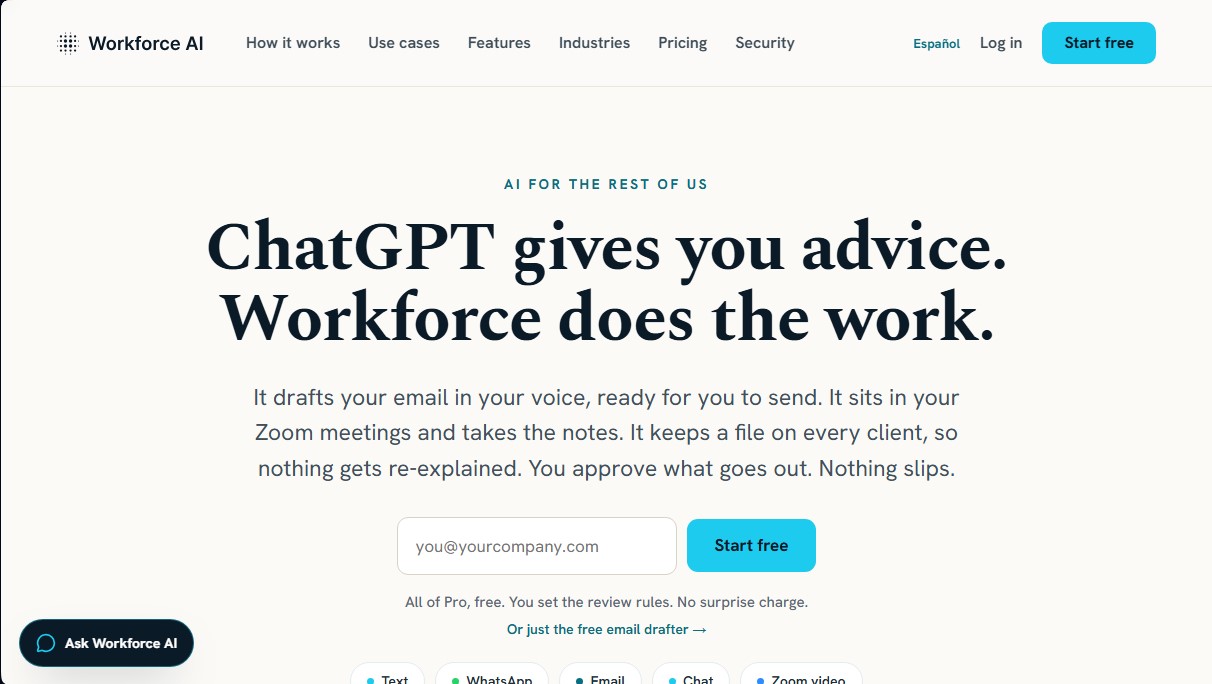
Workforce AI is an AI virtual employee platform designed for companies whose daily operations revolve around relationship management and constant communication. Unlike conventional chat assistants that only offer suggestions, this tool is focused on executing operational tasks, acting as a proactive team member that integrates into existing workflows without the need for technical knowledge or programming.
The primary function of Workforce AI is to free professionals from administrative burdens and client follow-ups. To achieve this, it utilizes an architecture based on AI agents that can perform actions across multiple channels. One of its most notable capabilities is its participation in Zoom meetings, where the virtual employee appears with a real-time video and voice avatar. During the session, the tool does more than just record; it can answer questions live and, upon completion, automatically generates summaries, meeting minutes, and a list of to-do items ready for execution.
Its technical operation is supported by deep integration with over 60 common corporate software tools, such as Gmail, Outlook, HubSpot, Slack, Salesforce, and Notion. By connecting these applications, the AI employee accesses a unified context for every client, allowing it to draft emails using the user's specific tone of voice and manage follow-ups via WhatsApp, SMS, or email.
The tool's key capabilities include:
- Multi-channel communication management: Drafting and auto-replying within messaging apps and email.
- Unified client memory: Maintains an updated history for each contact, including meeting notes, shared documents, and previous conversations.
- Recurring task automation: Executing scheduled processes and complex workflows using natural language.
- Control panel and approvals: A security system where the user must validate critical actions before they are sent, ensuring constant human oversight.
- Custom configuration: Allows for defining the AI agent's name, personality, image, and job description, similar to how you would handle a physical hire.
Workforce AI is especially useful for agencies, consultancies, financial advisors, and sectors such as real estate or legal, where the volume of meetings and emails often creates bottlenecks. Regarding security, the platform complies with SOC 2 Type II standards and is HIPAA compliant, ensuring that client data is encrypted and isolated by account, without being used to train shared models. It is a business productivity solution that allows a firm to scale its operational capacity without proportionally increasing its physical headcount.
Workforce-AI features and use cases
How to use Workforce-AI
Workforce-AI FAQ
What exactly is Workforce AI, and how does it differ from other AI assistants?
Workforce AI isn't limited to just offering advice or ideas; it executes actual tasks, such as drafting emails in your tone of voice or autonomously managing customer follow-ups.
How does the Workforce AI virtual employee participate in my Zoom meetings?
Your AI employee joins the video call with its own avatar and voice to answer questions in real-time and then generates a detailed summary with agreed-upon action items.
Do I have control over the messages Workforce AI sends to my customers?
Yes. You define the review rules, and the tool features an approval queue where you must give the green light before any response or action is finalized.
Which communication channels can I use to interact with my Workforce AI employee?
You can communicate with your AI employee and assign tasks via WhatsApp, text message, email, or through the integrated chat in the dashboard.
Do I need technical skills to set up Workforce AI?
You don't need to be an engineer. Setup is as simple as connecting your existing tools and describing your new AI employee's job role using natural language.
Which applications and tools can the platform integrate with?
The system features over sixty direct integrations, including popular tools like Gmail, Outlook, Slack, HubSpot, Salesforce, and Notion, among many others.
How does Workforce AI guarantee the security and privacy of my business data?
The platform is SOC 2 Type II certified and uses advanced encryption to ensure your data remains isolated and is never used to train shared language models.
What happens if I need my AI employee to perform recurring tasks?
You can schedule recurring tasks once, and your AI employee will execute them promptly according to the set schedule without needing any further reminders.
Workforce-AI pricing and plans
Free
$0/month for one user.
AI Email Writer (drafts only in Gmail and Outlook).
Draft creation using the user’s tone of voice.
Reduced monthly AI credit pool.
Basic user management and approval system.
Limited integrations; drafting only (no direct sending).
Starter
$99/month per user ($83/month billed annually).
Everything included in the Free plan.
Zoom integration with real-time avatar, summaries, and transcriptions.
Communication available via SMS, WhatsApp, email, and chat.
Planning and execution of multi-step and recurring tasks.
Long-term memory and knowledge base document uploads.
Access to 60+ available integrations.
Limits: 2 hours of avatar video and 10 hours of audio per month.
Pro
$249/month per user ($208/month billed annually).
Everything included in the Starter plan.
Ability to create up to 3 AI employees.
Expanded AI credit pool.
Higher-volume SMS and WhatsApp messaging bundles.
Approval queue and action audit logs.
Limits: 6 hours of avatar video and 30 hours of audio per month.
Business
Starting at $699/month for 3 users (starting at $583/month billed annually).
Everything included in the Pro plan.
10 AI employees shared across the team.
Shared pool of AI credits, video/audio hours, and messaging bundles.
Admin dashboard, centralized billing, and priority support.
Advanced approvals, user roles, and detailed audit logs.
Additional seats are $199/month ($166/month billed annually).
The tool also offers pay-as-you-go add-on packs if monthly limits are exceeded:
AI credit packs: starting at $10.
Extra audio meeting hours: $3/hour.
Extra avatar video hours: $6/hour.
Extra messaging (SMS/WhatsApp): $25 per 1,000 messages.
Workforce-AI Screenshots
Workforce-AI user reviews
Write a review
Checking your session...
Workforce-AI Reviews
Loading reviews...
Workforce-AI alternatives



TriggerFlow
Automate Windows apps without APIs using computer vision and AI. Manage PC fleets, monitor processes, and provide centralized remote control.

Relevance AI
Relevance AI lets companies design AI agents that take on work in sales, customer support, marketing, HR and operations, wired into the tools they already use.

