
Share
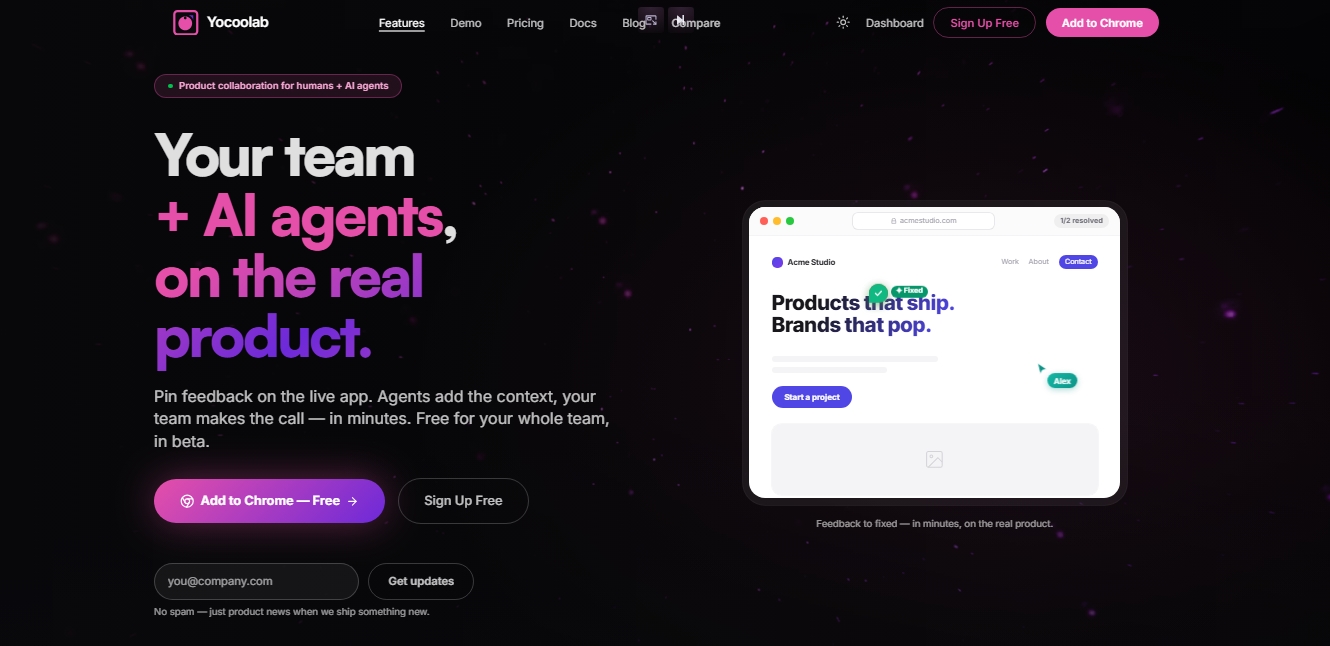
Pin feedback on live web apps. Teams and AI agents collaborate to fix bugs and generate pull requests, integrating with Jira, Linear, and GitHub.
What is Yocoolab?
Yocoolab is a technical collaboration platform designed to seamlessly connect human teams with AI agents directly on the actual product. This tool functions as a communication layer that overlays any live web application, whether in local development environments (localhost), staging, or production. Its primary goal is to streamline the feedback and bug-fixing cycle, allowing designers, developers, and product managers to interact with the interface and AI agents without leaving their browser.
The way Yocoolab works is based on a browser extension that allows users to pin comments and suggestions to specific UI elements. Unlike static capture tools, this solution automatically captures the full technical context, including CSS selectors, styles, screenshots, and the DOM state. This information is processed by AI agents connected via the MCP (Model Context Protocol), enabling models like Claude Code, Cursor, Cline, or Copilot to understand the root of the problem and propose precise technical solutions.
Key features of this AI tool for developers include:
Contextualized Feedback: Allows comments to be anchored to specific web elements, maintaining visual and technical references so the team knows exactly what needs to be fixed.
Automated Fixes: AI agents analyze conversation threads and source code to generate solution options, identify root causes, or even autonomously open Pull Requests (PRs) on GitHub.
UI State Management: Comments are linked to the interface state, meaning feedback left on a modal is only visible when that modal is active, preventing confusion.
Frictionless Collaboration: Supports guest comments via shareable links, allowing clients or external stakeholders to provide feedback without needing to create an account.
Integration with existing workflows is seamless, as Yocoolab connects with project management and communication tools like Jira, Linear, Slack, and Telegram. When an issue is detected, the system allows it to be sent to these bug trackers with a single click, attaching all necessary visual context. This eliminates the need for manual ticket writing or repetitive screenshots, as the AI agent handles the technical details.
This platform is particularly useful for Agile development teams looking to reduce the time between bug detection and resolution. As a web-oriented solution, it allows for reviews and replies to discussion threads from anywhere, even via mobile, facilitating real-time project oversight. Ultimately, Yocoolab transforms interface reviews into a dynamic process where AI agents act as active collaborators, handling the heavy lifting of debugging under human supervision.
Yocoolab features and use cases
How to use Yocoolab
Yocoolab FAQ
What exactly is Yocoolab, and what is it used for?
It's a collaboration platform that lets you pin comments to specific elements of a live web application, streamlining communication between humans and AI agents.
How much does it cost to add new team members to Yocoolab?
The tool is currently free to use during its beta phase, and there are no charges based on the number of users or invited collaborators.
What development environments can I use Yocoolab in?
It works on any active URL, so you can use it in local development environments, staging servers, or live production applications.
What integrations does Yocoolab offer for workflow management?
The tool syncs directly with platforms like Jira, Linear, Slack, GitHub, and Telegram to ensure feedback always ends up in the right place.
How do the AI agents work within Yocoolab?
These agents analyze the full context of comment threads and the source code to suggest technical solutions or automatically generate fix proposals.
Do external clients have to create an account to leave comments?
No, stakeholders can provide feedback on the live product via a guest link without needing to sign up or install anything.
What kind of information does Yocoolab capture when a comment is left?
When you drop a feedback pin, the tool automatically captures screenshots, element selectors, and CSS styles, giving developers all the context they need.
Yocoolab pricing and plans
Founding Member (Free during beta)
0 $/month
Unlimited repositories.
Unlimited users and teams (no per-seat costs).
Pin comments and screenshots to any URL.
Discussion threads with @mentions.
Browser extension (Chrome, Firefox, Edge).
Integrations with Jira, Linear, Slack, GitHub, and Telegram.
Use your own AI agents (MCP) and map elements to source code.
Branch-level tracking and deployment context.
Guest comments with no account required.
Post-Beta Plans
Check the official website. The tool is currently free for the entire team during the beta phase; users will be notified in advance before final pricing is established.
Yocoolab Screenshots
Yocoolab user reviews
Write a review
Checking your session...
Yocoolab Reviews
Loading reviews...
Yocoolab alternatives
Sprite Fusion
Generate and animate professional pixel art for games using AI. Create sprites, character sheets, and normal maps with direct export to Unity and Godot.

Redditapis
API to read, post, vote, and DM on Reddit without app reviews. Pay-as-you-go pricing, no subscription, and fast setup for AI agents.

LaunchProof
Audit websites across various browsers and devices to detect security, performance, or accessibility flaws, offering reports with solutions to fix them.
ParseCrate
Open-source, self-hosted document processing API. Converts PDFs and Office files into structured content with OCR and table detection for AI applications.
Together Link
Connect coding agents to open models to cut costs. Keep your existing tools and settings while optimizing token usage in every session.
