AI Image Combiner
Share
AI Image Combiner
Merge multiple images into a realistic AI composition. Automatically adjust lighting and color to create professional HD composites.
General Information about AI Image Combiner
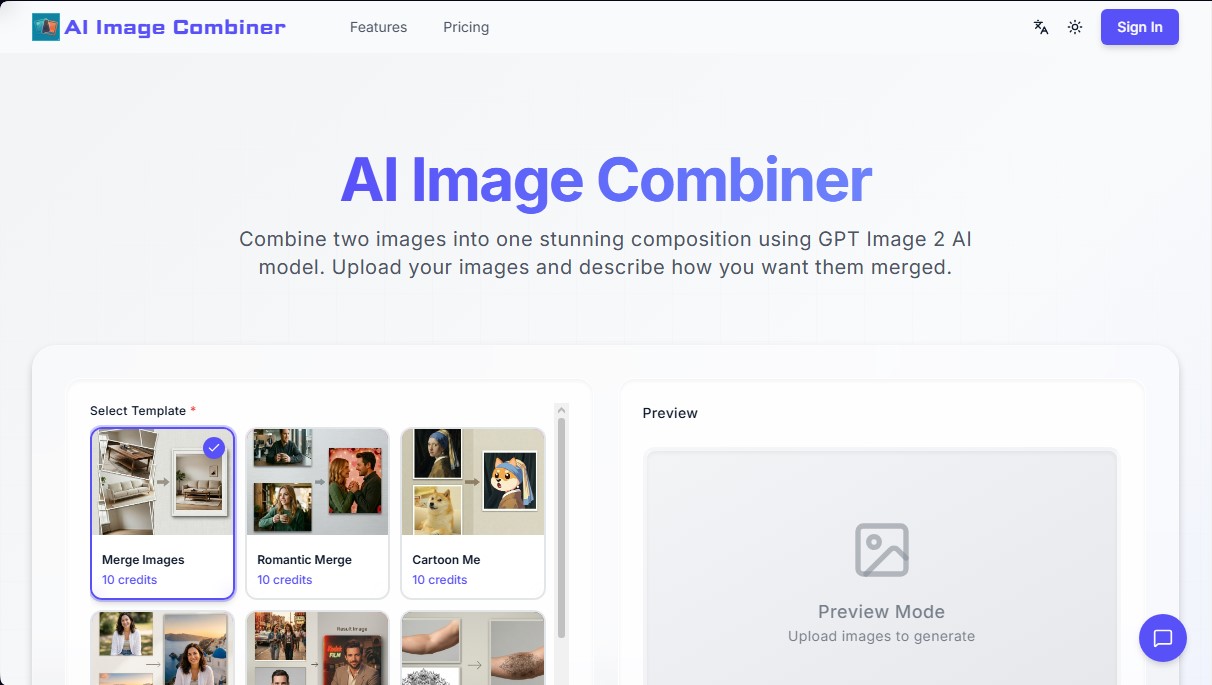
AI Image Combiner is an advanced AI-powered tool designed to merge and compose images automatically and professionally. Unlike conventional editors that require complex manual adjustments, this AI image combiner uses the GPT Image 2 model to analyze critical elements such as lighting, colorimetry, and perspective, achieving seamless integration between uploaded files. Its primary function is to allow any user, regardless of technical experience, to combine two photos or more into a single coherent and realistic composition from their computer or mobile device.
The platform's operation is straightforward and relies on computer vision processing. Users must upload between 2 and 9 images (in JPG, PNG, or WebP formats up to 10MB) and select a template or write a custom prompt. The AI blending technology interprets the instructions and visual elements to generate a result in an estimated 10 to 30 seconds. The system provides high-resolution (HD) output, eliminating the need for manual blending that often leads to artificial-looking results.
Among the main capabilities and key functions of AI Image Combiner, the following stand out:
- Specialized templates: It features pre-configured modes like Romantic Merge, Travel Memory, Nostalgic Vibes, or Cartoon Me, which facilitate the creation of specific styles with a single click.
- Merging people: It allows you to put two people together in the same photograph naturally, automatically adjusting skin tones and ambient light.
- Product photography: It is an effective solution for the e-commerce sector, allowing products to be combined with lifestyle backgrounds to generate professional marketing content.
- Total creative control: Through the use of text descriptions, users can define the style, mood, and exact arrangement of elements in the final image.
- Privacy and security: Uploaded files are encrypted and automatically deleted from the servers after one hour of processing, ensuring that data is not used to train external models.
This tool is ideal for content creators, social media managers, and design professionals who need to merge images with AI quickly and without watermarks. By automating the correction of common manual editing errors, AI Image Combiner positions itself as an efficient alternative for generating unique visual content, artistic collages, or project previews like tattoos and advertising mockups, always ensuring a professional-quality finish ready for commercial or personal use.
Features and Use Cases of AI Image Combiner
How AI Image Combiner Works
Frequently Asked Questions about AI Image Combiner
What is AI Image Combiner and what is its purpose?
It is a tool that allows you to merge multiple images into a single composition using artificial intelligence to automatically adjust lighting and style.
How many photos can I upload at once to AI Image Combiner?
You can upload between two and nine images per session to create your compositions or collages quickly and easily.
How does the credit system work when using the tool?
Each merging process consumes credits from your account. Basic templates cost ten credits, while more complex options like collages cost fifteen.
Are my photos secure when processing them with AI Image Combiner?
Your privacy is a top priority. Images are encrypted during processing and are permanently deleted from our servers after one hour.
Do the downloaded images include a watermark?
No, the final results are high-definition and do not contain any watermarks, allowing you to use them directly in your projects.
What file formats and sizes does the platform support?
You can upload files in JPG, PNG, and WebP formats, provided that each image does not exceed the maximum file size of ten megabytes.
How long does it take for AI Image Combiner to generate the final image?
The system typically takes between ten and thirty seconds to complete the merge, depending on the complexity of the request and server traffic.
Can I use the generated images for commercial purposes?
Yes, you have full ownership of the generated images and can use them freely for your brand, social media, or any other commercial activity.
AI Image Combiner Pricing
Free Version
New users receive free starter credits upon sign-in—no credit card required.
No watermarks.
HD quality.
Access to style merging and blending tools.
Starter Pack - 2,99 $ (One-time payment)
300 credits.
Generate up to 30 images (average cost is 10 credits per generation).
Valid for 1 year.
Fast generation speed.
No watermarks.
Private generations.
Priority generation queue.
Growth Pack - 9,99 $ (One-time payment)
1,100 credits.
Generate up to 110 images.
Valid for 1 year.
Fast generation speed.
No watermarks.
Private generations.
Priority generation queue.
Professional Pack - 19,99 $ (One-time payment)
2,300 credits.
Generate up to 230 images.
Valid for 1 year.
Fast generation speed.
No watermarks.
Private generations.
Priority generation queue.
AI Image Combiner Screenshots