Share
What is GifGenerator?
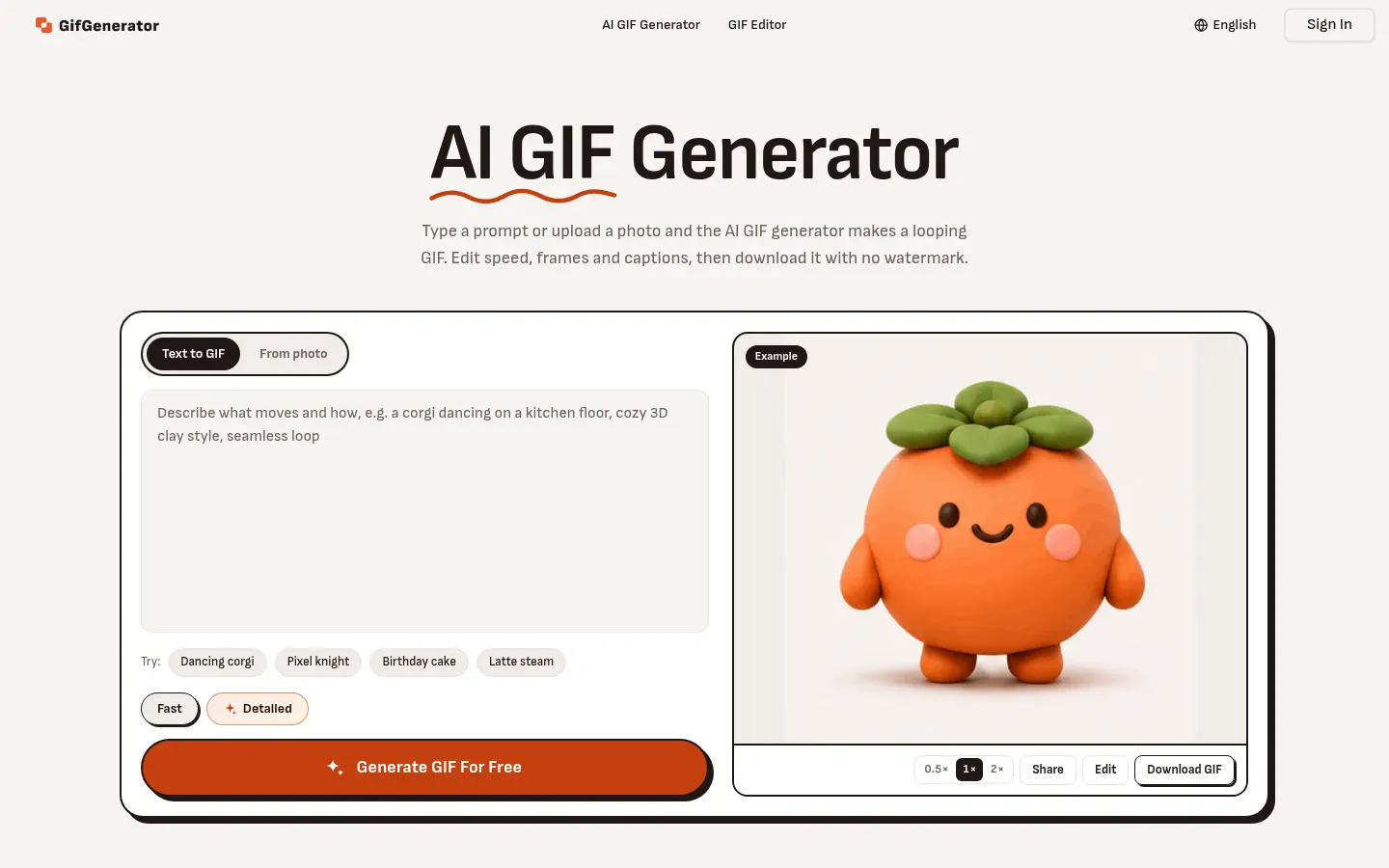
GifGenerator is an AI GIF generator that turns a prompt, photo, sketch or logo into a looping animated GIF and opens it straight in an editor to tweak speed, frames and captions. It is built for memes, reactions, product animations and small brand moments without any animation skills.
How does GifGenerator work?
In text-to-GIF mode you describe in one sentence what moves and how, and the AI draws every frame; the last frame joins back to the first so the loop doesn’t jump. It handles cartoon, 3D clay and pixel art styles and 2 to 16 frames. In image-to-GIF mode you upload up to 12 JPEG, PNG or WebP images and describe the motion (a head tilt, steam rising from a cup); you can point at a picture with @, as in “make the cat in @image1 wave”. It keeps your photo’s subject, colors and background. There is a Fast mode for drafts and a Detailed mode up to 768 px.
What can you edit afterwards?
The built-in editor lets you slow it down, reverse it or play it back and forth, drop or reorder frames and add one line of text across every frame. With a single written instruction (“make it blue”) the AI redraws all frames, and you can also make point edits on a specific frame.
Who is GifGenerator for?
- Meme makers and anyone sending reaction GIFs.
- Community managers who need original GIFs for posts.
- Brands animating a logo or a product photo.
- Illustrators bringing a sketch or watercolor to life.
GifGenerator pros and cons
Pros: you can use it without signing up, GIFs carry no watermark, commercial use is allowed, and speed, frame and caption edits use no credits. Cons: output tops out at 768 px, and the 16-frame ceiling limits longer animations.
GifGenerator features and use cases
How to use GifGenerator
GifGenerator FAQ
What is GifGenerator?
GifGenerator is an AI GIF generator that turns text, photos, sketches or logos into editable looping animated GIFs.
Is GifGenerator free?
Yes, there is free use with daily credits and no watermark; for more volume there are plans and packs. See the pricing section.
Do I need to sign up?
Not to try it: you can make GIFs without an account, though a free account gets credits that refill every day.
Can I animate my own photo?
Yes. Upload a JPG or PNG, describe the motion and the AI keeps the subject, colors and background in every frame.
How many frames does a GIF have?
Between 2 and 16 frames, and the last one joins the first so the loop runs without a jump.
Can I use the GIFs commercially?
Yes. According to the official site, commercial use is allowed and GIFs carry no watermark.
Does GifGenerator have an API?
The official site does not mention a public API; it is used in the browser.
Does GifGenerator work in Spanish?
The interface is in English; you can write prompts in Spanish, but check the result.
What are the alternatives to GifGenerator?
On GptZone you can compare it with Text to GIF, which also makes AI GIFs, or with Pika for longer animated clips.
GifGenerator pricing and plans
Reference price: 89.94 USD / year. Source · Verified: November 14, 2026
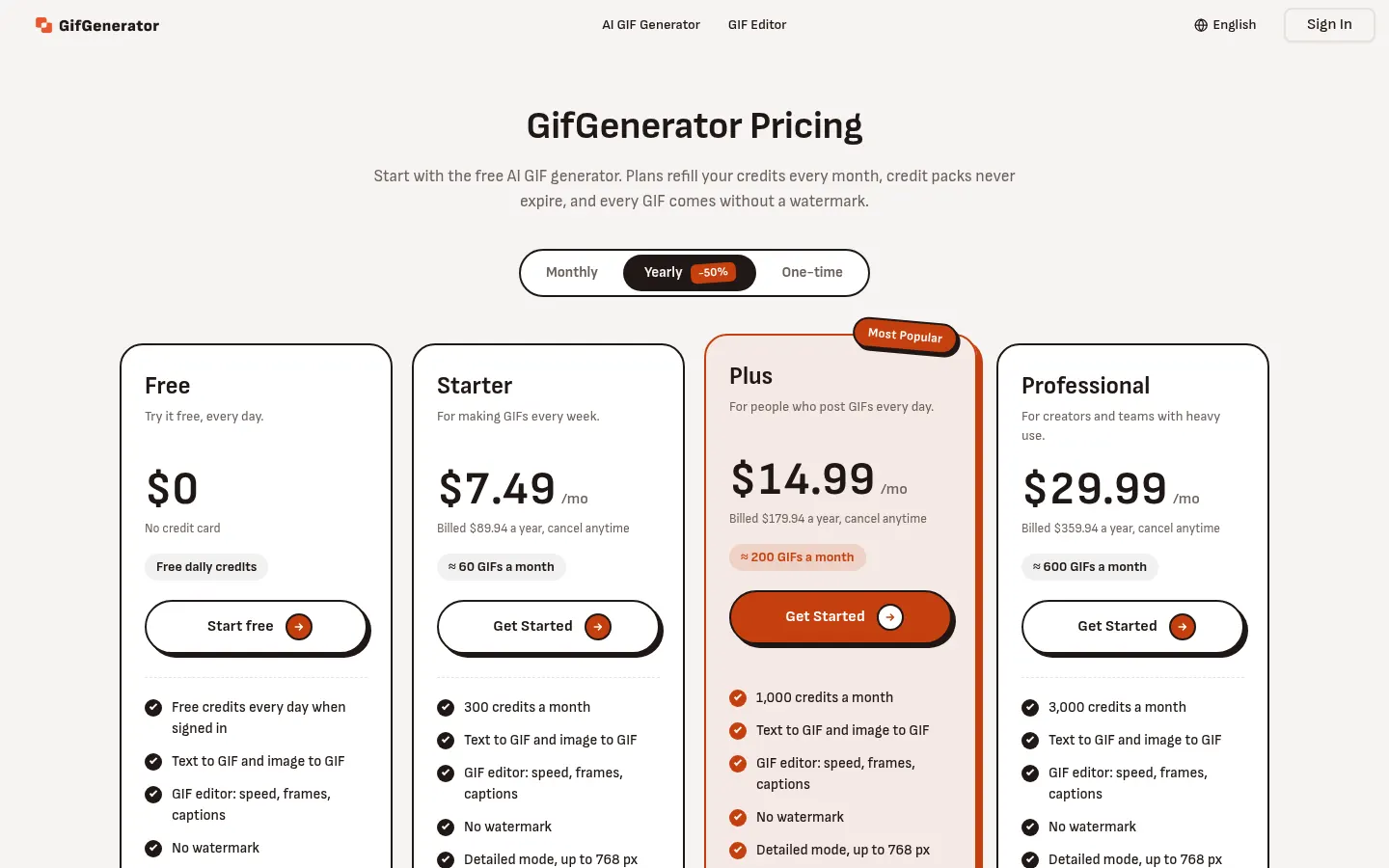
Prices in US dollars (USD) per the official site. Checked on: 16/11/2026. A Fast GIF costs 5 credits and a Detailed one 10; speed, frame and caption edits are free.
Free: daily credits when signed in, no card, no watermark.
Starter: $7.49/month billed yearly ($89.94/year), 300 credits a month (≈60 GIFs).
Plus: $14.99/month billed yearly ($179.94/year), 1,000 credits (≈200 GIFs).
Professional: $29.99/month billed yearly ($359.94/year), 3,000 credits (≈600 GIFs).
Monthly billing is also offered (yearly saves 50%), plus one-time credit packs that never expire.
GifGenerator Screenshots
GifGenerator user reviews
Write a review
Checking your session...
GifGenerator Reviews
Loading reviews...
GifGenerator alternatives

Text to GIF
Text to GIF is an AI GIF generator that creates looping animations from a written description, with frame and timing control, plus sticker packs and SVG files.



Background Remover Video
Automatically remove backgrounds from any video without a green screen. Export in 4K with transparent or solid colors while preserving original audio.