Share
Native SQL IDE for AI with MCP support. Manage databases, compare schemas, and use SQL notebooks to optimize workflows with AI agents.
What is Jam SQL Studio?
Jam SQL Studio is a cross-platform SQL Integrated Development Environment (IDE) specifically designed to integrate with AI agents. Following the retirement of Azure Data Studio, this tool has emerged as a robust alternative for database management on macOS, Windows, and Linux computers. Its primary function is to streamline database administration through an AI-native approach, allowing both developers and AI assistants to interact with SQL code efficiently and securely.
The application’s technology is built on the Model Context Protocol (MCP). By running a local MCP server, Jam SQL Studio enables external AI tools, such as Claude Desktop or GitHub Copilot, to communicate with databases in a controlled manner. The AI can list connections and execute read-only queries under strict security policies, utilizing token authentication and audit logs. Additionally, the AI Workspace automatically generates context files (such as CLAUDE.md) that describe the schema and history, helping agents understand the data structure before proposing changes or writing complex queries.
Key functional capabilities include:
- Smart IntelliSense: Context-aware code completion for tables, columns, and functions with real-time error checking.
- Execution Plan Visualization: Tools to identify bottlenecks through graphical representations and performance comparisons.
- Schema and Data Comparison: Utilities to synchronize structures and records across different databases by generating DDL and DML scripts.
- SQL Notebooks: Integration of SQL, JavaScript, and Markdown cells into Jupyter-compatible .ipynb files for documentation and operational manuals.
- Integrated Charts: Generation of data visualizations (bar, line, pie) directly from query results for quick reporting.
Jam SQL Studio offers native support for a wide variety of engines, including Microsoft SQL Server, PostgreSQL, MySQL, Oracle, MariaDB, SQLite, and Azure SQL. The tool facilitates navigation via an intuitive table explorer and a visual dependency viewer that displays foreign key relationships as connected nodes.
To ensure privacy, AI features are disabled by default and require explicit activation. The system prioritizes local security, allowing secure connections via Microsoft Entra ID and managing transactions with manual or smart commit modes. It is an ideal solution for database administrators and developers looking for a modern SQL client that leverages the potential of LLMs and automation without compromising infrastructure integrity.
Jam SQL Studio features and use cases
How to use Jam SQL Studio
Jam SQL Studio FAQ
Is Jam SQL Studio compatible with Mac and Linux operating systems?
Yes, Jam SQL Studio is a cross-platform desktop application available for macOS, Windows, and Linux.
Can I use Jam SQL Studio as an alternative now that Azure Data Studio is being discontinued?
Jam SQL Studio was specifically designed as a complete replacement, featuring advanced AI capabilities and schema comparison tools.
What databases does Jam SQL Studio support?
The tool offers full support for Microsoft SQL Server, PostgreSQL, MySQL, MariaDB, Oracle, SQLite, and Azure SQL.
Is there a free version of Jam SQL Studio?
Yes, the Personal plan is free forever and includes unlimited connections to SQL Server and PostgreSQL without requiring an account.
How does AI help in Jam SQL Studio?
The tool allows you to integrate AI agents via the MCP protocol and features a built-in Claude-powered chat for generating queries and analyzing schemas.
Do I need an account to start using the tool?
No registration or account creation is required to download and start using the application's basic features immediately.
Does Jam SQL Studio include tools for query performance analysis?
Yes, the application allows you to visualize detailed execution plans with tree diagrams and charts to identify performance bottlenecks in your statements.
Can I import my query files from other applications?
You can directly open your .sql query files and .ipynb notebooks while retaining full editor functionality and autocomplete.
Is using AI features in professional environments secure with Jam SQL Studio?
Security is a top priority; AI features are disabled by default, and the MCP server runs exclusively locally with token-based authentication.
What is included in the Pro version of Jam SQL Studio?
The Pro subscription adds advanced features such as schema and data comparison, execution plan visualization, and a license for commercial use.
Jam SQL Studio pricing and plans
Personal
Free forever
- Unlimited SQL Server, PostgreSQL, and MySQL connections.
- IntelliSense and code autocompletion.
- Query execution and results visualization.
- Table explorer and data editing.
- Basic charts.
- AI Workspace synchronization.
- Execution plan analysis.
- Priority support.
Pro Monthly
9,99 $ per month
- Includes all Personal plan features.
- AI Workspace synchronization.
- Advanced execution plan visualization.
- Advanced charts and export options.
- Schema comparison tools.
- Priority email support.
- Commercial use license.
- Includes a 14-day free trial of Pro features.
Pro Annual
99 $ per year
- Includes all Personal plan features.
- AI Workspace synchronization.
- Advanced execution plan visualization.
- Advanced charts and export options.
- Schema comparison tools.
- Priority email support.
- Commercial use license.
- Save 17% compared to monthly billing.
- Includes a 14-day free trial of Pro features.
Enterprise
Custom pricing (contact sales)
- Volume licensing for teams.
- Dedicated priority support.
- SSO/SAML (coming soon).
- Personalized account management.
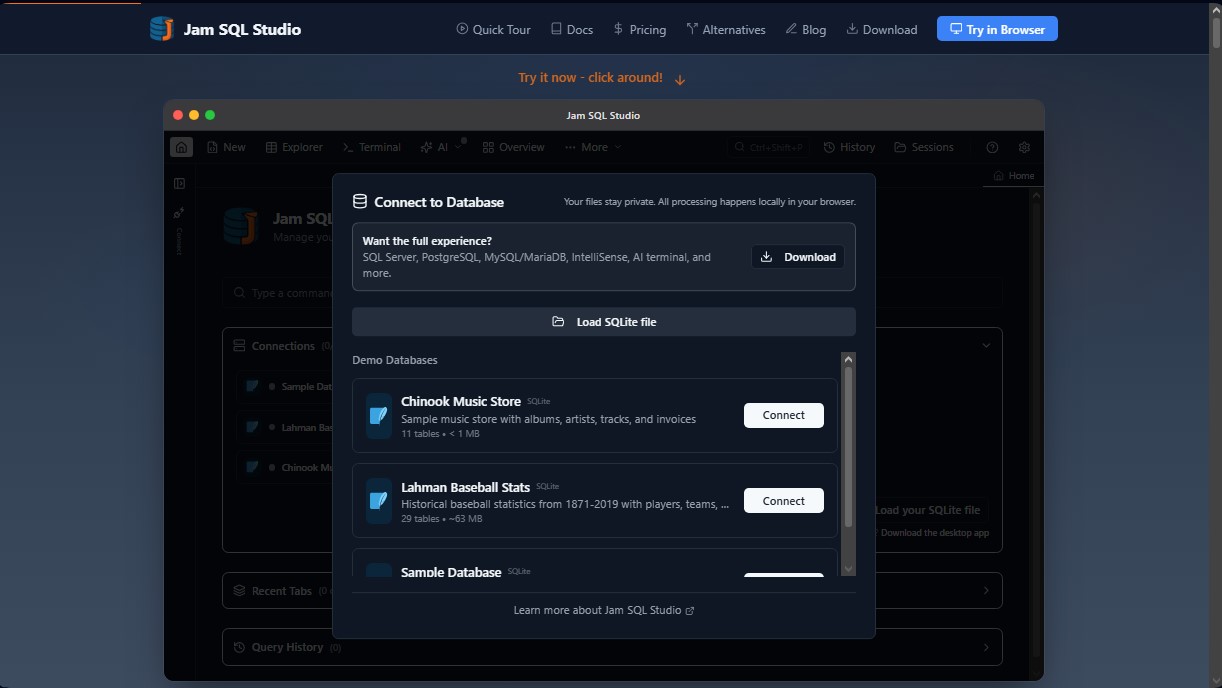
Jam SQL Studio Screenshots
Jam SQL Studio user reviews
Write a review
Checking your session...
Jam SQL Studio Reviews
Loading reviews...
Jam SQL Studio alternatives
Together Link
Connect coding agents to open models to cut costs. Keep your existing tools and settings while optimizing token usage in every session.


Optimus by Iacon Autonomics
Autonomous researcher designing experiments and evaluating algorithms to train AI models. Automates improvement cycles for LLMs, robotics, and various complex systems.


Nuclr Commander
Workspace for running multiple AI agents in parallel with a file manager. Supports local or external models and remote mobile monitoring.