Share
Create mind maps where each node is an AI chat. Branch ideas while maintaining context, summarize content, and organize information on an infinite canvas.
What is mindmap.io?
mindmap.io is an advanced AI-powered mind mapping platform designed to structure thinking and explore ideas hierarchically. Its primary function allows each node in the map to act as an independent AI chat, making it easy to dive deep into specific subtopics without losing the project's overall perspective. This tool is especially useful for professionals who need to manage knowledge bases, students organizing complex information, or development teams brainstorming with language models.
The functionality of mindmap.io stands out for its intelligent context management. Each branch of the map retains information from the parent nodes, allowing the generative AI to respond coherently within the established train of thought. Users can interact with various frontier models such as Claude, ChatGPT, Gemini, Grok, and DeepSeek all within the same canvas, making it easy to compare results. Additionally, it features Milo, an AI agent specialized in automatically editing, organizing, and expanding mind maps to accelerate research.
From a functional standpoint, the tool offers a seamless experience on both desktop and mobile devices via the browser, with no installation required. It supports rich content, allowing users to attach PDF files, images, and Markdown notes, while also offering a color-coding system for efficient visual organization. One of its most innovative capabilities is semantic zoom, which uses AI to generate automatic summaries of extensive branches, allowing users to scan large maps at a glance.
Its main advantages and features include:
- Promptmap creation: Use nodes as prompts that maintain downward context to avoid repetition and maintain focus.
- Classic note nodes: The ability to combine manual annotations and traditional outlines with AI-generated responses.
- Interactive publishing: Maps can be shared via public links or embedded in other platforms, allowing third parties to view or clone the structure.
- Guaranteed privacy: The system does not train its algorithms on user data; information is only sent to the selected model provider to process the query.
- Optimized interface: Controls designed for heavy keyboard use, streamlining the workflow for creating intelligent mind maps.
This application positions itself as a robust solution for those seeking AI productivity tools that go beyond a simple chat, offering a visual and structured environment for data analysis and idea generation. It is an ideal choice for turning brainstorming sessions into actionable, easy-to-navigate knowledge structures.
mindmap.io features and use cases
How to use mindmap.io
mindmap.io FAQ
What exactly is mindmap.io and what is it used for?
It is an AI-powered mind mapping tool that allows you to expand any idea into chat branches while maintaining a global view of the entire layout.
Do new branches in mindmap.io remember the context of previous chats?
Yes, each branch retains information from the parent path so the AI understands the context, ensuring you don’t have to repeat instructions.
What kind of content can I include in my map nodes?
Nodes can contain plain text, images, PDF files, Markdown notes, and color-coded tags to make visual organization easier.
How can I share my maps with other users?
You can publish your map via a public link so others can view it or even copy it to their own workspace to continue editing.
Can I use mindmap.io on my mobile phone?
Yes, the tool works directly in mobile and tablet browsers with touch controls optimized for navigating and editing without installing an app.
Are my personal maps used to train AI models?
No, your data is not used for model training, and your queries are only sent to the selected AI provider to generate a response.
How does the semantic zoom feature help with very large maps?
This feature condenses all nodes into a single-line summary, allowing you to clearly visualize the entire map structure at a glance.
Can I use the tool for free?
Yes, there is a free plan that allows you to create up to three mind maps with unlimited branches and a daily limit on AI features.
Which AI models can I connect to mindmap.io?
The platform allows you to use the most advanced models on the market, such as GPT, Claude, Gemini, Grok, or DeepSeek, all within the same workspace.
mindmap.io pricing and plans
Free
Up to 3 mind maps with infinite branches.
Keyboard-optimized controls.
Export to PNG and Markdown.
Share interactive maps via link or embed code.
AI usage on any node.
Limit of 3 daily generations with limited models.
Mindmaps: $7/month ($5/month billed annually)
Unlimited mind maps with infinite branches.
Includes everything in the Free plan.
Semantic zoom with automatic AI summaries.
Priority support.
Limit of 50 daily generations with limited models.
Promptmaps: $29/month ($20/month billed annually)
Includes everything in the Mindmaps plan.
Access to all leading models (GPT, Gemini, Claude, Kimi, DeepSeek).
Use Milo, the AI agent for building maps.
AI-powered topic auto-expansion.
Compare different models on a single canvas.
Includes $10/month in AI usage (10x the usage of the previous plan).
Lifetime: $99 (one-time payment)
Lifetime access to all current features and future updates.
Includes $20 in AI credits.
Priority support.
Option to top up credits at any time.
Enterprise: Visit the official website
Custom plans for teams based on specific needs.
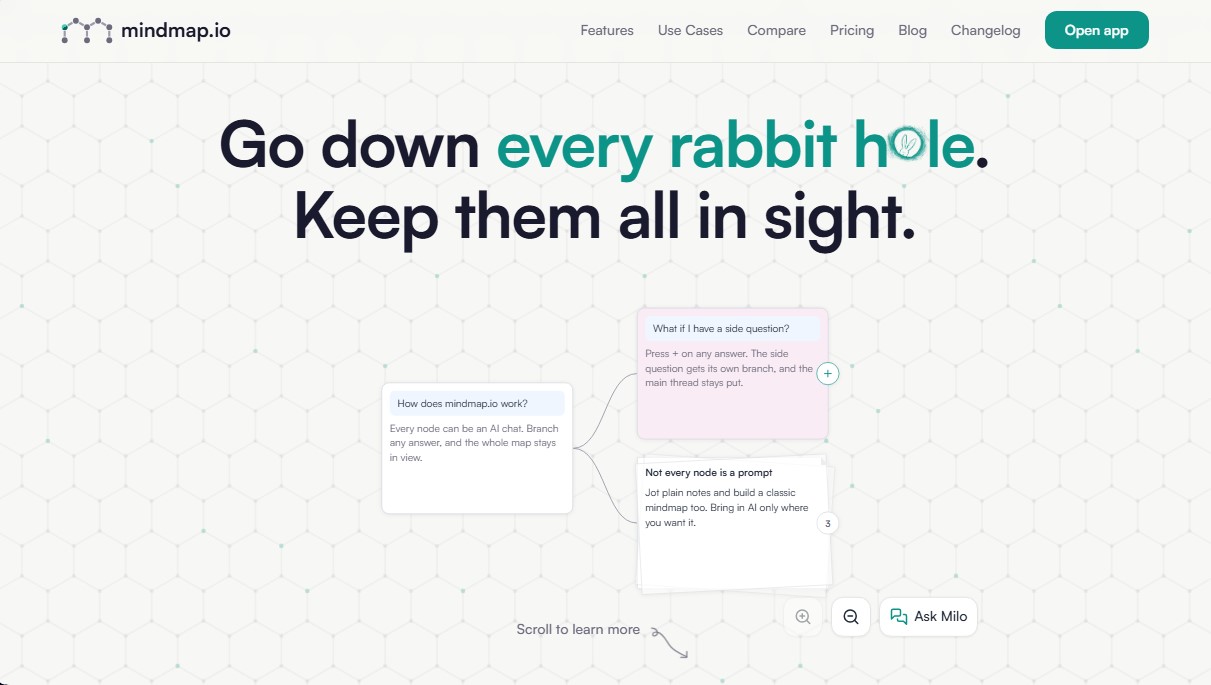
mindmap.io Screenshots
mindmap.io alternatives



Agent-Native
Agent-Native is an open-source TypeScript framework for building AI agents with a proper UI, where the agent and the interface share actions, data and state.

rabbit OS3
Agentic OS that automates tasks and manages files, connecting your computers with AI models to run workflows using natural language.