
Share
Chat with PDFs to get summaries, answers, and extract key data. Includes OCR technology to analyze scanned files.
What is PDF.ai?
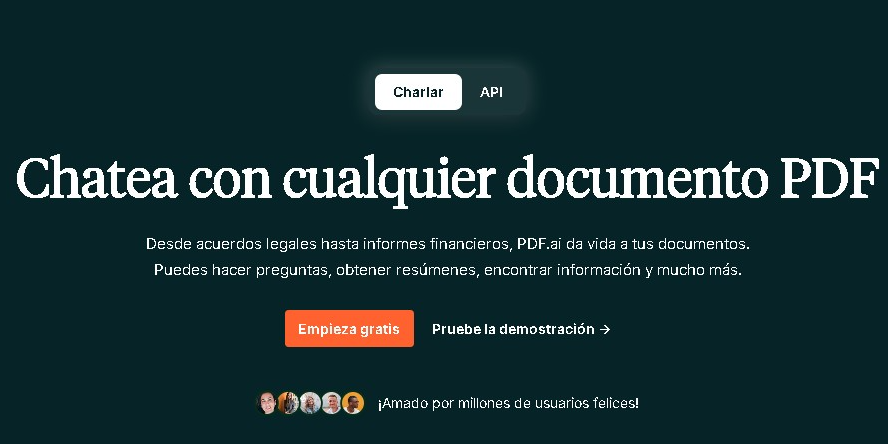
PDF.ai is an artificial intelligence platform designed to transform document management through conversational interaction with PDF files. Its fundamental purpose is to allow users to "chat" with their documents, facilitating information extraction, the creation of automatic summaries, and the analysis of long texts without the need for a full manual reading. This tool optimizes productivity by turning static files into dynamic, searchable data sources in real time.
The operation of PDF.ai is based on advanced Natural Language Processing (NLP) models, which allow the system to understand the context and semantics of the information contained within the file. Thanks to this technology, users can ask complex questions and receive precise answers based strictly on the content of the uploaded document. Additionally, the platform incorporates OCR capabilities (Optical Character Recognition), allowing it to process and understand scanned PDFs or image-based documents—an essential feature for digitizing legacy workflows.
The primary capabilities of this AI document tool include:
- Conversational analysis: Allows you to query the document to obtain specific data, clarifications, or chapter summaries directly.
- Key information extraction: Automatically identifies relevant concepts, dates, names, or technical data within the text, eliminating the need to scroll manually through pages.
- Cloud synchronization: Offers integration with storage services like Google Drive and Dropbox, facilitating direct file imports from the web.
- Browser extension: Features a Chrome add-on that enables the agile use of AI functions while browsing from a computer.
This software is especially beneficial for students, researchers, and legal or financial professionals who handle large volumes of technical documentation. By drastically reducing the time spent searching for specific data, PDF.ai improves efficiency in both academic study and administrative work. The interface is designed to be intuitive, ensuring that any user, regardless of technical expertise, can take advantage of AI-powered PDF analysis.
Ultimately, it is a versatile solution that adapts to both occasional use and demanding professional environments. Whether via mobile or desktop, the tool guarantees quick access to critical information, removing reading barriers in dense documents and improving the ability to process large amounts of specialized text.
PDF.ai features and use cases
How to use PDF.ai
PDF.ai FAQ
What exactly is PDF.ai and what is it used for?
It is an AI-powered platform that allows you to interact with your PDF documents conversationally to ask questions, request summaries, or extract specific data without reading the entire text.
Can I use PDF.ai for free?
Yes, the tool offers a free plan called "Hobby" that allows you to upload one document per month and ask a limited number of questions to test its basic features.
Can PDF.ai read scanned documents or images?
Yes, the platform uses OCR technology to process and understand text within scanned files or documents that are purely image-based.
What are the limitations of the PDF.ai free plan?
This free plan allows you to upload a single file each month with a maximum size of 10 MB and sets a daily limit on the number of questions you can ask the AI.
How can I integrate PDF.ai into my daily workflow?
You can use the official Chrome browser extension or connect the tool to cloud storage services like Google Drive and Dropbox to analyze your files directly.
Is there a PDF.ai plan that allows for unlimited document uploads?
Yes, the Ultimate plan is designed for users who need to upload files and ask questions without limits through a monthly or annual subscription.
What benefits does the PDF.ai Enterprise plan offer for businesses?
This tier provides priority support, allows for larger file sizes, includes team collaboration features, and offers API access for custom integrations.
Do I need to read the entire document before using PDF.ai?
No, it isn't necessary. The AI analyzes the content for you and answers your questions based on the text, saving you time on long or complex documents.
PDF.ai pricing and plans
Free Plan (Hobby)
- Price: 0 €
- Upload 1 PDF per month with a maximum size of 10 MB.
- Includes a limited number of monthly questions and queries.
Pro Plan
- Price: Approximately 10 to 15 USD/month (based on monthly or annual billing).
- Upload up to 100 PDFs.
- Increased monthly question limit.
- Includes full OCR functionality and Chrome extension access.
Ultimate Plan
- Price: Approximately 20 to 27 USD/month (based on monthly or annual billing).
- Unlimited PDF document uploads.
- Unlimited questions and queries.
Enterprise Plan
- Price: From 30 to 37 USD/month (depending on configuration and billing).
- Support for larger file sizes.
- Licensed for commercial use.
- Priority technical support.
- Includes team options and API access.
PDF.ai Screenshots
PDF.ai alternatives

Nuclr Commander
Workspace for running multiple AI agents in parallel with a file manager. Supports local or external models and remote mobile monitoring.

rabbit OS3
Agentic OS that automates tasks and manages files, connecting your computers with AI models to run workflows using natural language.