
Share
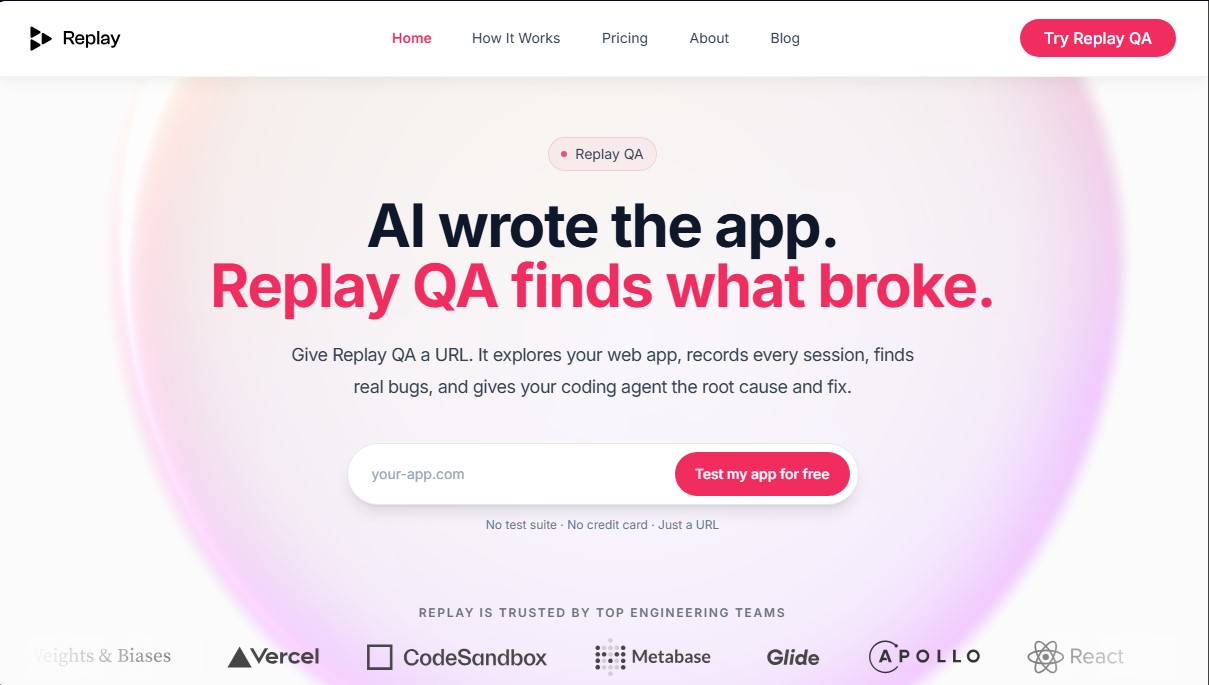
Automatically detect web app bugs via URL. Identify root causes, record sessions, and suggest solutions without writing manual tests.
What is Replay QA?
Replay QA is an AI-powered quality assurance (QA) automation solution specifically designed for modern web applications. Its primary function is to bridge the gap between AI-accelerated development speeds and the slow pace of traditional software testing. This tool enables engineering teams, developers, and founders to ensure product stability without the need to manually write test suites or configure complex environments.
The platform's operation is straightforward: the user only needs to provide a URL for their web application. From that point on, Replay QA’s AI autonomously explores the site, discovers navigation flows, and executes dynamic tests. During this process, the system records every user session, making it easier to identify real bugs on the computer or browser before they reach the end user.
One of Replay QA's most powerful capabilities is its focus on root cause analysis. When the tool detects a failure, it doesn't just issue an alert; it provides the necessary technical data and a suggested fix so that an AI coding agent or a human developer can correct the error immediately. This eliminates the tedious process of trying to manually reproduce bugs, a task that typically consumes hours of technical work.
The platform's technology is built on a high-fidelity recording engine—the same one trusted by engineering teams at companies like Vercel, Glide, and Metabase. Key features and functional benefits include:
- Autonomous Exploration: The ability to navigate marketing sites, SaaS tools, and internal applications without prior configuration.
- Private Environment Testing: Supports login (auth) flows, allowing for the testing of applications behind an authentication wall.
- CI/CD Integration: Connects with existing workflows in Playwright or Cypress, analyzing failures and posting the solution directly to Pull Requests (PRs).
- API for AI Platforms: Offers a Replay QA API to integrate automated quality controls into systems that generate code at scale.
This tool is especially valuable for agile development environments where software is deployed frequently. By acting as a constant feedback loop, Replay QA ensures that applications maintain significant test coverage regardless of delivery speed. It is a practical solution for optimizing the debugging workflow and improving the reliability of any web product through automation.
Replay QA features and use cases
How to use Replay QA
Replay QA FAQ
What is Replay QA and how does it work?
Replay QA is an AI-powered tool that explores your web application via its URL to detect bugs, record sessions, and provide the root cause of the failure along with a proposed technical solution.
Do I need to write code or set up tests to use Replay QA?
You don't need to write any test suites or deal with complex technical configurations. Simply provide your website’s URL, and the system will automatically start working.
What types of web applications can the tool analyze?
It can analyze any application accessible via a URL, including marketing sites, SaaS products, and internal tools, regardless of the technology used to build them.
Can Replay QA test applications that require a login?
Yes, the platform allows you to set up authenticated flows by providing the necessary credentials, enabling the AI to explore and test the private sections of your website.
What information is included in Replay QA error reports?
The reports include a full recording of the session where the error occurred, a technical root cause analysis, and precise instructions so your development team can quickly implement a fix.
Can Replay QA be integrated with existing workflows like Playwright?
Yes, you can use the tool in your CI/CD pipelines to record Playwright or Cypress runs, allowing it to automatically analyze failures and post solutions directly to your pull requests.
Is there a free version to try the service?
We offer a permanent free plan that allows for up to twenty monthly analyses with no commitment and no credit card required.
How does Replay QA help applications built with AI coding tools?
The tool closes the development loop by providing the automated quality assurance layer that AI-generated applications often lack, ensuring bugs are detected and resolved before they affect users.
Replay QA pricing and plans
Free
$0 per month
20 analyses per month.
No time limit.
No credit card required.
Individual
$49 per month ($42/mo billed annually)
50 analyses per month.
Built for solo developers with multiple apps or workflows.
Team
$349 per month ($299/mo billed annually)
300 analyses per month.
Designed for startups and small teams that need constant coverage and frequent deployments.
Enterprise
Custom pricing (based on usage or seat count)
Custom analysis volume.
Tailored contracts and support.
Adapted to the specific needs of large organizations.
Replay QA Screenshots
Replay QA user reviews
Write a review
Checking your session...
Replay QA Reviews
Loading reviews...
Replay QA alternatives
Together Link
Connect coding agents to open models to cut costs. Keep your existing tools and settings while optimizing token usage in every session.


Optimus by Iacon Autonomics
Autonomous researcher designing experiments and evaluating algorithms to train AI models. Automates improvement cycles for LLMs, robotics, and various complex systems.


Nuclr Commander
Workspace for running multiple AI agents in parallel with a file manager. Supports local or external models and remote mobile monitoring.