
Share
What is Eugene?
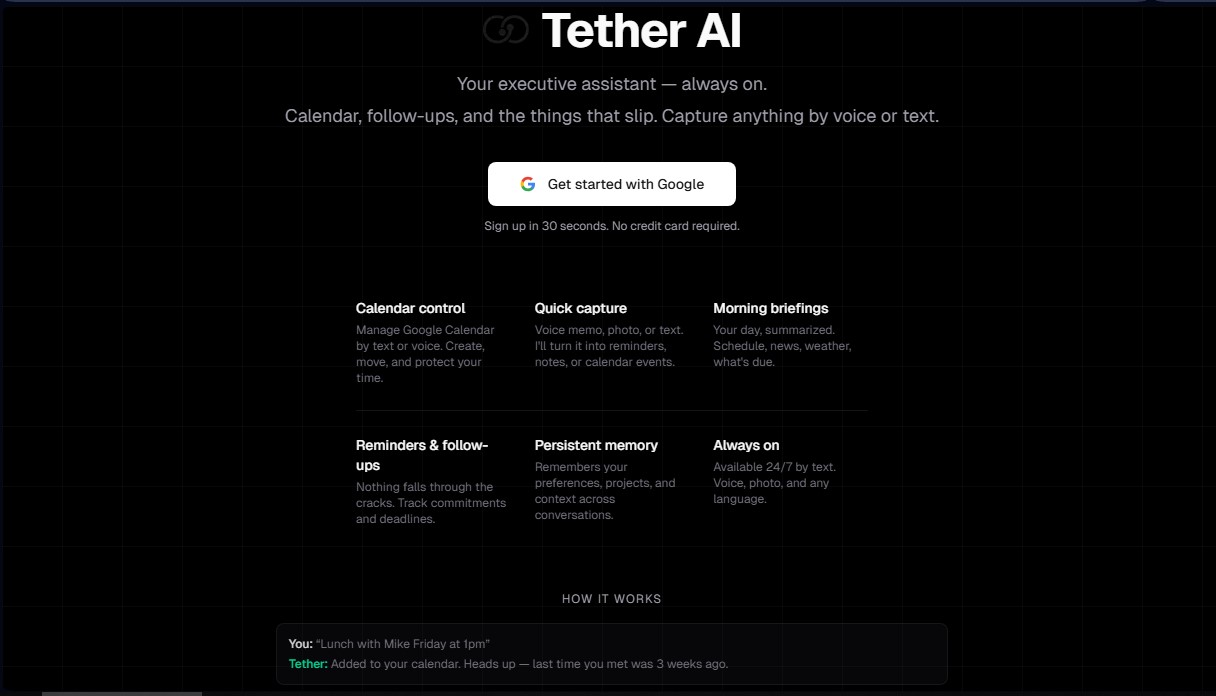
Eugene (formerly Tether-AI) is a virtual executive assistant designed for high-capacity professionals who need to delegate administrative tasks without technical friction. Unlike conventional chatbots, this tool works directly through messaging apps like Telegram or SMS, eliminating the need to install additional software on your computer or phone. Its primary function is to act as a digital chief of staff that manages your calendar, performs follow-ups, and proactively captures relevant information.
How it works
The technological core of Eugene is built on artificial intelligence with persistent memory. This allows it to remember preferences, specific projects, and the context of past conversations, offering a personalized experience that evolves with the user. The tool fully integrates with Google Calendar, enabling you to create, modify, or protect time blocks using voice commands or natural language text.
Key features
Its core capabilities and practical benefits include:
- Calendar Management: Comprehensive control over appointments and events. It allows you to check availability and organize your schedule through simple messages.
- Rapid Data Capture: Automatically transforms voice notes, photos, or short texts into reminders, organized notes, or scheduled events.
- Morning Briefings: Generates daily summaries sent to your phone, including the day's agenda, relevant news, weather forecasts, and urgent tasks.
- Follow-ups and Reminders: Tracks commitments and project deadlines to ensure no important detail is overlooked.
- Autonomous Routines: The ability to execute scheduled tasks, such as news summaries or weekly reviews, sending the results directly to the chat.
Who it's for
This AI productivity solution is specifically geared toward founders, executives, sales leaders, and consultants who manage multiple daily meetings and various stakeholders. Eugene’s competitive advantage lies in its proactive approach; while other AI tools are reactive and wait for a command, this tool anticipates your needs by sending pre-meeting alerts with context from previous interactions and relevant metrics.
More details
Because it is cloud-hosted, the platform is operational 24/7, processing information in any language without requiring user maintenance. The sign-up process is instantaneous, linking to your Google account so you can start operating from your preferred chat interface. It is a solid option for those seeking the capabilities of a human personal assistant with the immediacy and scalability of artificial intelligence.
Eugene features and use cases
How to use Eugene
Eugene FAQ
What is Eugene, and how can it help me in my daily routine?
It is a smart executive assistant that manages your calendar, reminders, and tasks via text or voice messages without the need to install any additional apps.
How does Eugene integrate with my Google Calendar?
The tool connects directly to automatically create, reschedule, and protect events on your calendar, allowing you to manage your time using simple text commands.
Is it possible to send voice memos to Eugene to create reminders?
Yes, you can send audio messages and the assistant will convert them into notes, tasks, or calendar events by identifying key details and mentioned deadlines.
How is Eugene different from other AI chatbots like ChatGPT?
Unlike reactive chatbots, this assistant is proactive. It remembers your preferences and long-term projects and sends you morning briefings without you having to ask for them.
What is included in Eugene's morning briefing each day?
You will receive a message with the weather forecast, the most relevant news, your full daily agenda, and any pending tasks that require your immediate attention.
Do I need a credit card to start using Eugene?
No. Eugene is free to start with about 10 messages a day and 3 active routines; Pro costs $14.99 a month for unlimited use.
Who is Eugene primarily designed for?
It is designed for founders, executives, sales leaders, and consultants who manage multiple daily meetings and need constant support to ensure no commitment slips through the cracks.
How does Eugene remember my preferences and previous contacts?
The assistant features persistent memory that stores the context of your past conversations, current projects, and details about the people you meet with on a regular basis.
Eugene pricing and plans
Reference price: 14.99 USD / month. Source · Verified: October 19, 2026
Free: $0
- About 10 messages a day with every feature.
- 3 active routines.
- Reminders always fire.
- No card to start.
Eugene Pro: $14.99/month
- Unlimited messages.
Eugene Screenshots
Eugene user reviews
Write a review
Checking your session...
Eugene Reviews
Loading reviews...
Eugene alternatives




rabbit OS3
Agentic OS that automates tasks and manages files, connecting your computers with AI models to run workflows using natural language.